
What Is an AI Scheduling Agent? 4 Generations Explained
Learn what an AI scheduling agent is, how the category evolved, and why calendar-driven agents go beyond booking meetings.
TL;DR
An AI scheduling agent is software that uses AI to manage, optimize, and act on your calendar — moving beyond time-slot coordination to context-aware preparation, prioritization, and execution of calendar-driven work.
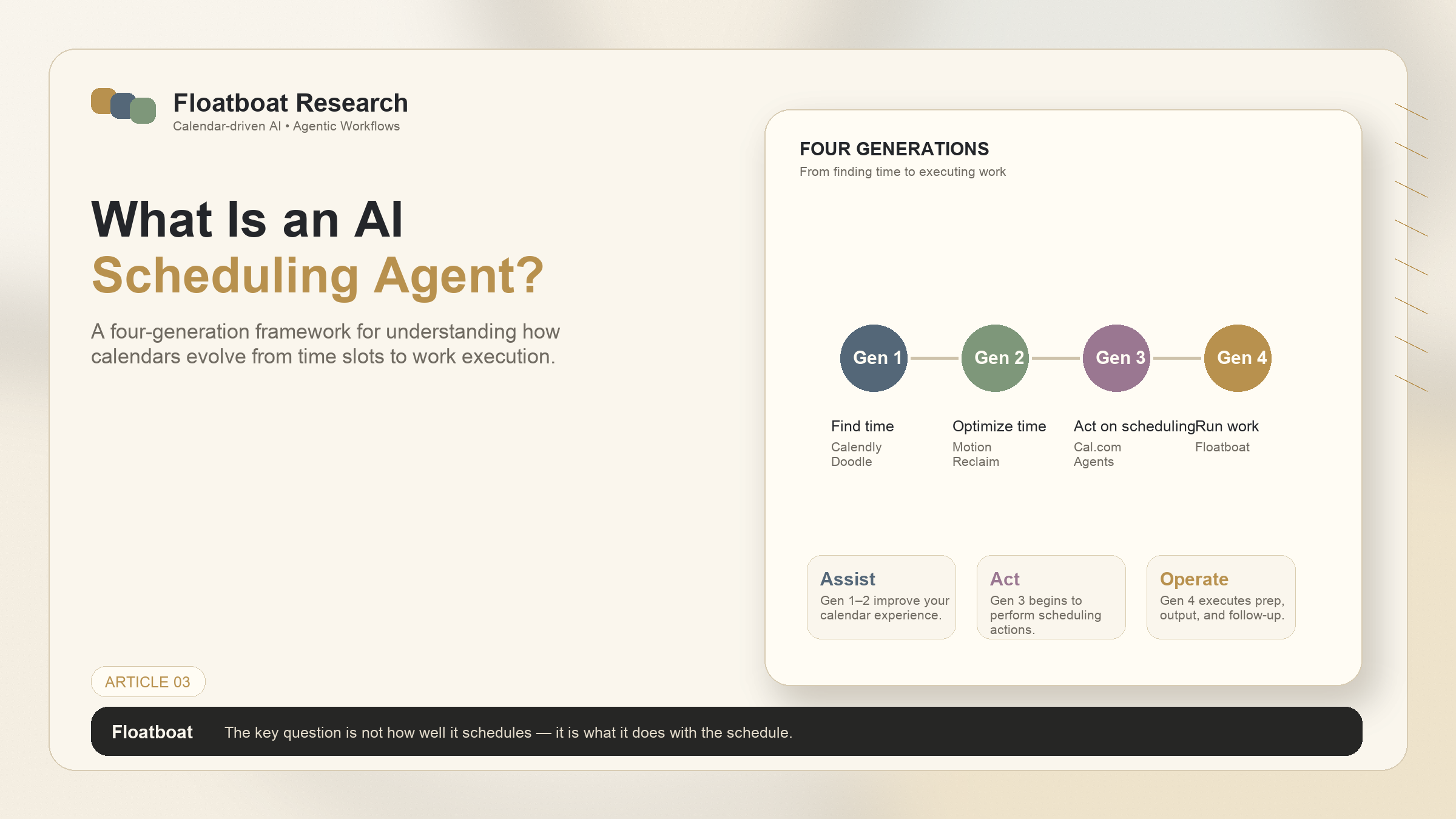
The market has evolved through four generations: smart schedulers (Calendly), AI optimizers (Motion, Reclaim, Morgen), AI scheduling agents (Agentic Calendars, Cal.com Agents), and calendar-driven agent operating systems (Floatboat).
The key question when evaluating any tool isn't "how well does it schedule?" — it's "what does it do with the schedule once it's there?"
Gen 1 and Gen 2 save you time. Gen 3 and Gen 4 save you work. The distinction matters if your calendar runs your business.
Your Calendar Is More Than a Schedule
If you run a one-person business, your calendar isn't a list of appointments. It's your company's operating system.
Every sales call demands a brief, talking points, and a follow-up email. Every client deadline triggers a deliverable that needs drafting, reviewing, and shipping. Every investor update requires context from the last meeting, the current numbers, and a forward-looking narrative. The calendar tells you when — but the real work is what to say, what to deliver, and what happens next.
Traditional calendar tools answer only the first question. They show you the slot. They send a reminder 10 minutes before. They mark the event as "done" when it's over. For a solo operator, that's like having an assistant who tells you where the meeting is, then walks away.
This isn't a niche frustration. Simply Business's 2025 Solopreneur Report found that 61% of solopreneurs underestimated how difficult it is to handle every function alone — and calendar-driven work (meetings, deadlines, follow-ups) is the thread that ties those functions together. Every function — sales, delivery, operations, content — shows up on the calendar. Managing the calendar is managing the business.
And that's where AI scheduling agents enter the picture. Not to help you find time — but to help you do something with it.
What Is an AI Scheduling Agent, Actually?
The term "AI scheduling agent" is young enough that it means different things depending on who you ask. Some people mean "an AI that finds open slots on my calendar." Others mean "an AI that runs my work from the calendar." The gap between those two definitions is where the entire category lives.
A working definition that captures the full spectrum:
An AI scheduling agent is software that uses artificial intelligence to manage, optimize, and act on your calendar — moving beyond time-slot coordination to context-aware preparation, prioritization, and execution of calendar-driven work.
What distinguishes the narrow end from the broad end isn't whether AI is involved — it's what the AI is asked to do.
Dimension | Narrow AI Scheduling (Gen 1–2) | Broad AI Scheduling Agent (Gen 3–4) |
|---|---|---|
Core task | Find time, block time, prevent conflicts | Prepare meeting context, execute deadline-driven tasks, auto-follow up |
Trigger | You tell it what to schedule | It reads your calendar and knows what to do |
Output | A time slot on a calendar | A brief, a draft, a deck, a follow-up email |
Relationship to calendar | Calendar as container | Calendar as runtime |
The jump from left column to right column isn't incremental. A tool that optimizes time slots is solving a scheduling problem. An agent that prepares, executes, and follows up is solving a work problem. The calendar is the same. The question being asked of it is different.
This is also why "AI scheduling" is a genuinely ambiguous search term. Google Trends shows rising volume for the phrase, but the intent behind it is split: some searchers want a better Calendly, others want an AI that runs their day. The market is still being educated. That makes a framework useful — which is what the next section provides.
The Four Generations of AI Scheduling
AI scheduling didn't arrive all at once. It evolved through four generations, each answering a deeper question about what a calendar should do. Understanding this progression helps you place any tool — including the one you're currently using — on a maturity spectrum, and decide whether you've outgrown it.
Generation | Era | Core Question Answered | Representative Tools | What They Actually Do |
|---|---|---|---|---|
Gen 1 | ~2013– | "When are we both free?" | Calendly, Doodle, Google Calendar appointment slots | Automated availability sharing, booking links, basic timezone handling |
Gen 2 | ~2019– | "What should I work on right now?" | Motion, Reclaim, Clockwise, Morgen | AI-powered task prioritization, auto-scheduling, conflict resolution, habit learning. They optimize your calendar like a game of Tetris |
Gen 3 | ~2023– | "Can you handle the context around this meeting?" | Agentic Calendars, Cal.com Agents, Findem/Glider AI (recruiting-specific) | Natural language event creation, meeting prep, follow-up drafts. Domain-specific agents appear. Still largely reactive — you initiate or configure |
Gen 4 | ~2025– | "Can you run my work from the calendar — automatically?" | Floatboat (Calendar-Driven Proactive Agent OS) | Calendar as runtime. Events trigger agents that prep, execute, and follow up — without prompts. Every event gets persistent workspace with files, run history, and model choice |
Gen 1: Smart Schedulers
Gen 1 solved a real problem: finding mutual availability without the back-and-forth email ping-pong. Calendly, which launched in 2013, turned "what times work for you?" into a link. Doodle simplified group polling. Google Calendar added appointment slots.
For a solopreneur booking external calls, Gen 1 tools are still essential infrastructure. They handle the coordination layer so you don't have to. But they were never designed to do anything with the time once it's booked. A Calendly link fills your calendar; it doesn't prepare you for what's on it.
Gen 2: AI Optimizers
Around 2019, tools like Motion, Reclaim, and Clockwise asked a better question: not just "when are you free?" but "what should you be doing right now?" They introduced AI-powered task prioritization, automatic calendar Tetris, and habit learning — your calendar reshuffles itself around your actual work patterns.
Morgen, a more recent Gen 2 entrant, added an AI Planner layer on top of calendar consolidation and task management, giving daily planning recommendations across unified calendars. The Gen 2 category has matured to the point where several tools do the optimization job well.
For someone with 3–5 internal meetings per day, Gen 2 is a genuine step up in productivity. But here's the ceiling: optimizing the arrangement of tasks on a calendar is not the same as doing the tasks. Gen 2 tools make your schedule efficient. They don't make your work happen.
Gen 3: AI Scheduling Agents
Gen 3 tools began to cross the line from scheduling to execution. Agentic Calendars, for instance, reads incoming emails and automatically books appointments — an agent that watches your inbox and acts on scheduling requests without human routing. The trigger is an email arriving; the output is a confirmed calendar event. It's a narrow but real example of an agent that runs without being prompted.
Cal.com Agents took a different architectural approach: an open platform that lets developers build scheduling agents that live wherever work happens — Slack, Telegram, CLI, API, and OpenClaw-compatible environments. Rather than building one scheduling agent, Cal.com built infrastructure for many, making scheduling agents embeddable across the tools teams already use.
On the enterprise side, Findem and Glider AI developed recruiting-specific scheduling agents: AI that coordinates interviews across candidates, hiring managers, and panels, handling the multi-party complexity that general-purpose schedulers struggle with. They are Gen 2–3 hybrids — domain-constrained but demonstrating what happens when scheduling agents are built for a specific vertical rather than a general audience.
What unifies Gen 3 is a shift in posture: these tools don't just wait for you to tell them what to schedule — they watch for scheduling signals (an email, a hiring workflow, a platform event) and act on them. But they're still largely reactive. An email arrives, an agent books. A workflow triggers, an agent coordinates. Gen 3 agents respond to events; they don't proactively prepare for them.
Gen 4: Calendar-Driven Proactive Agent OS
Gen 4 changes the relationship between calendar and agent entirely. The calendar isn't a target for optimization — it's the runtime that the agent operates on.
Floatboat is designed specifically for this generation: every calendar event becomes a trigger for a complete work pipeline, from pre-meeting briefs to deadline-driven drafts and post-meeting follow-ups. The work is initiated from the calendar event itself rather than from a separate prompt. In practice, each event can become a persistent workspace with files, run history, and model choice across frontier and open models. Events don't just hold time — they hold the work produced for and from that time.
The architectural shift is from "AI that schedules" to "AI that operates." Gen 1–3 tools answer the question "when?" Gen 4 answers "what now?" — by reading your calendar rhythm and executing the work that rhythm implies.
The jump from Gen 2 to Gen 3 isn't incremental — it's a category shift. Gen 1 and Gen 2 treat the calendar as a container for time. Gen 3 and Gen 4 treat it as a source of context and a trigger for action. If you're evaluating tools, the most important question isn't "how well does it schedule?" — it's "what does it do with the schedule once it's there?" That distinction separates time-savers from work-doers, and it explains why some solo operators are already quietly moving up the stack.
Who Needs an AI Scheduling Agent?
Not everyone needs Gen 3 or Gen 4. The level you need maps to your calendar complexity — how many external events you have, how much preparation each one demands, and whether you have anyone else to share the load.
Your Calendar Profile | Recommended Level | Why |
|---|---|---|
1–2 meetings/day, mostly internal | Gen 1–2 | Bottleneck is finding mutual time, not preparing for it |
3–5 meetings/day, mix of external clients and stakeholders | Gen 2–3 | Context switching has real cost; basic prep becomes valuable |
5+ external meetings/day + you still need to ship deliverables | Gen 3–4 | Prep and follow-up workload exceeds meeting time itself |
Solo founder / one-person business | Gen 4 | No assistant, no team division of labor — your calendar is your entire operating system |
The last row matters more than it used to. Carta's 2025 data shows that solo founders now account for 36.3% of new U.S. companies, up from 23.7% in 2019. These aren't people who chose to work alone temporarily — they're building companies structured around being solo from day one. For them, the calendar isn't a time management tool. It's the task allocation mechanism that a team would otherwise provide.
A solo founder doesn't have a sales team to prep the deck, an account manager to write the follow-up, or an ops person to track the deliverables. Every calendar event carries the full stack of work around it. If a tool only manages the slot, the founder is still doing everything else manually. That's the gap Gen 4 addresses — and it's the one most likely to grow as the solo founder share of new companies continues rising. (For a deeper look at whether solo operators should adopt AI agents at all, we wrote a separate analysis.)
How to Evaluate an AI Scheduling Tool
Most comparison articles focus on feature checklists: does it have team scheduling? Round-robin? Buffer times? Those questions matter for Gen 1–2 tools. But if you're evaluating across generations — and you should be, because the calendar complexity data suggests many people are using a lower generation than they need — you need deeper questions.
Here are five that cut across the four-generation framework:
1. Does it prep, or just schedule?
When a client call appears on your calendar, does the tool give you a brief — who they are, what was discussed last time, what materials you'll need? Or does it just show you a colored block and a title? Gen 1 and Gen 2 tools stop at the block — they were built for time coordination, not content preparation, and their architecture reflects that. Gen 3 tools begin to close this gap: Agentic Calendars, for instance, captures the context of each scheduling interaction automatically. Gen 4 tools treat prep as the default — every event on your calendar triggers a preparation pipeline that builds a brief from your past interactions, current files, and the event's stated purpose. The difference is visible: one shows you a calendar entry, the other hands you the materials you need before you walk into the room.
2. Does it follow up, or just remind?
A reminder tells you the meeting is starting — useful, but mechanically simple. A follow-up tells you what happened in the meeting and what needs to happen next, which requires an entirely different level of calendar awareness. Gen 3 tools are beginning to handle this: Cal.com's platform-native agents can trigger post-event workflows in Slack or Telegram, and Agentic Calendars automatically captures the outcome of a scheduling interaction. Gen 4 tools extend this to full meeting-to-action pipelines — the follow-up email, the updated deck, the next task — all initiated automatically because the event ending is itself a trigger. For a solo operator who just finished a client call and is already behind on three other things, the difference between a reminder and a follow-up is the difference between knowing what happened and having the next step already done.
3. Does it learn your context, or just your availability?
Most scheduling tools treat each meeting as an isolated time block — a slot on a grid with a title. They don't remember what you discussed last time, what files were relevant, or what decision was made. Gen 1 and Gen 2 tools are stateless by design: they optimize the grid but don't build a memory. Gen 3 and Gen 4 tools take the opposite approach. They maintain persistent event workspaces — files, run history, decisions, and model choices — that carry forward to the next related event. When a follow-up meeting appears on your calendar, the agent doesn't start from zero. It already knows who was there, what was said, and what was left open. This is the difference between a calendar that holds events and a calendar that holds institutional memory.
4. Does it trigger automatically, or wait to be prompted?
This is the defining architectural question, and it's where the generations diverge most clearly. Gen 1 and Gen 2 tools require you to initiate: you create the task, you configure the schedule, you tell the system what to optimize. Gen 3 tools respond to external signals — an email arrives and the agent books the meeting, a hiring workflow fires and the agent coordinates panels — but the signal still has to come from somewhere outside the agent. Gen 4 tools flip the relationship: the calendar rhythm itself is the signal. A deadline approaching triggers a draft. A meeting ending triggers a follow-up. A quarterly review appearing on the calendar triggers data gathering. The agent isn't waiting for you to type something or for an external event to fire — the calendar is the event stream, and every entry on it is an instruction.
5. Does it work with the tools you already use?
Can the agent read your local files, access your Google Drive and Notion, reach into your Slack and email — or does it require you to move everything into its platform? Cal.com Agents addresses this through platform-native integrations, embedding scheduling agents directly into Slack, Telegram, CLI, and API environments rather than asking teams to adopt a new interface. Floatboat takes a different approach, using protocols such as MCP and IACT to connect agents with the files, calendars, and communication channels you already work in. Gen 1 tools are largely walled gardens — the booking page is the product, and data doesn't leave it easily. For a solo operator, integration quality isn't a nice-to-have. If the agent can't see your actual work environment — the Notion pages you reference before calls, the Google Docs you draft deliverables in, the Slack threads where decisions get made — it can't prepare meaningfully. The best scheduling agent is the one that works where your work already lives.
These five questions map neatly onto the four-generation framework. Gen 1 and Gen 2 tools score well on question 5 (integrations) but fail questions 1–4 — they were never designed for execution. Gen 3 tools start to address questions 1 and 2, but still require human initiation for question 4. Gen 4 is the tier designed to say "yes" across all five.
For a solo founder evaluating tools, the relevant question isn't "which scheduler is best?" — it's "do I need a scheduler, or do I need an operator?" The answer changes once your calendar stops being a list of meetings and starts being your company's operating system.
The Next Shift: From Scheduling to Execution
Gen 1 and Gen 2 tools have solved the "when" problem well. Calendly makes booking painless. Motion and Reclaim optimize task placement with genuine intelligence. Morgen unifies scattered calendars and adds planning recommendations. If your primary friction is "I can't find time for things," these tools have you covered.
But for a growing number of solo operators, the friction has shifted. It's no longer "I can't find time" — it's "I found the time, but I still have to do all the work that fills it." That's a different problem, and it demands a different category of tool.
Floatboat is built for that shift. It's not a better Calendly alternative or a smarter Motion competitor — it's a calendar-driven agent OS, a Gen 4 tool that assumes the calendar isn't just a schedule to manage but a runtime to operate on. It reads the rhythm of your calendar, identifies what each event demands, and executes the work without waiting for a prompt.
That doesn't mean Gen 1 and Gen 2 tools become obsolete. You can keep Calendly for external booking — it does that job well. Motion and Reclaim still do a solid job of Tetris-ing your tasks into available windows. Floatboat tackles what they were never built for: the actual work that fills every slot. The tools are complementary, not competitive — they operate at different layers of the stack.
The calendar isn't the goal. It's the trigger. The best AI scheduling agent is the one that makes your calendar produce output, not just hold events.
FAQ
What is the difference between an AI scheduling agent and a calendar app?
A calendar app shows you when. An AI scheduling agent figures out what to do with that time. Google Calendar and Apple Calendar are time containers. AI scheduling agents — across all four generations — add intelligence on top: finding optimal slots, prioritizing tasks, preparing context, and (at Gen 4) executing work automatically.
Do I still need Calendly if I use an AI scheduling agent?
Yes, for external booking. Gen 1 tools like Calendly handle the coordination layer — letting people outside your organization find time on your calendar. Gen 2+ tools complement that layer rather than replacing it. You can run Calendly for booking and a Gen 4 tool for execution on the same calendar.
Can an AI scheduling agent join my meetings?
Gen 3 tools can provide pre-meeting context and research. Gen 4 tools prep briefs before meetings, draft follow-ups after, and maintain per-event workspaces with files and run history. Actual meeting joining — the agent sitting in your Zoom call — varies by tool and is not a standard capability across the category as of mid-2026.
Is an AI scheduling agent the same as a virtual assistant?
Related but different. A virtual assistant is a human service — someone you hire to manage your calendar and tasks. An AI scheduling agent is software that runs on your machine, with no dependency on another person's availability, time zone, or working hours. The two can coexist: a virtual assistant might configure your AI scheduling agent, or the agent might handle routine scheduling while the human VA handles judgment-intensive coordination.
How do I choose between Gen 2, Gen 3, and Gen 4?
Use the five-question framework from this article. If you only need scheduling optimization (better task placement, conflict resolution) → Gen 2. If you need basic meeting prep and email-driven scheduling → Gen 3. If your calendar is your operating system — you have no team, no assistant, and every event demands real work output → Gen 4.
Can AI scheduling agents handle multi-party coordination across different organizations?
Gen 1 tools (Calendly, Doodle) handle this well for simple availability polling. Gen 2 tools (Motion, Reclaim) are better suited to internal team scheduling. For complex multi-party, cross-organization coordination — like interview panels across companies — domain-specific Gen 3 tools (Findem, Glider AI) offer dedicated solutions. General-purpose Gen 3 and Gen 4 tools are improving here but may still require manual override for edge cases involving external calendars with restrictive sharing policies.
Related Articles
Disclosure: Floatboat is a calendar-driven proactive agent OS (Gen 4 as defined in this article) developed by AOE Tech Labs Limited. This article is a category analysis based on publicly available information. Gen 1–3 tools are described based on publicly available documentation and community discussion as of June 2026.
Related Articles
Get automation tips for your workflow
Weekly insights for non-technical professionals. No spam ever.