
What Is an Agentic Calendar? Definition and Examples
An agentic calendar uses scheduled events to trigger AI prep, execution, and follow-up. Learn the definition and key properties.
disclosure: "This article defines the agentic calendar category. Floatboat is an agentic calendar product. References to other tools are based on publicly available documentation as of June 2026."
TL;DR
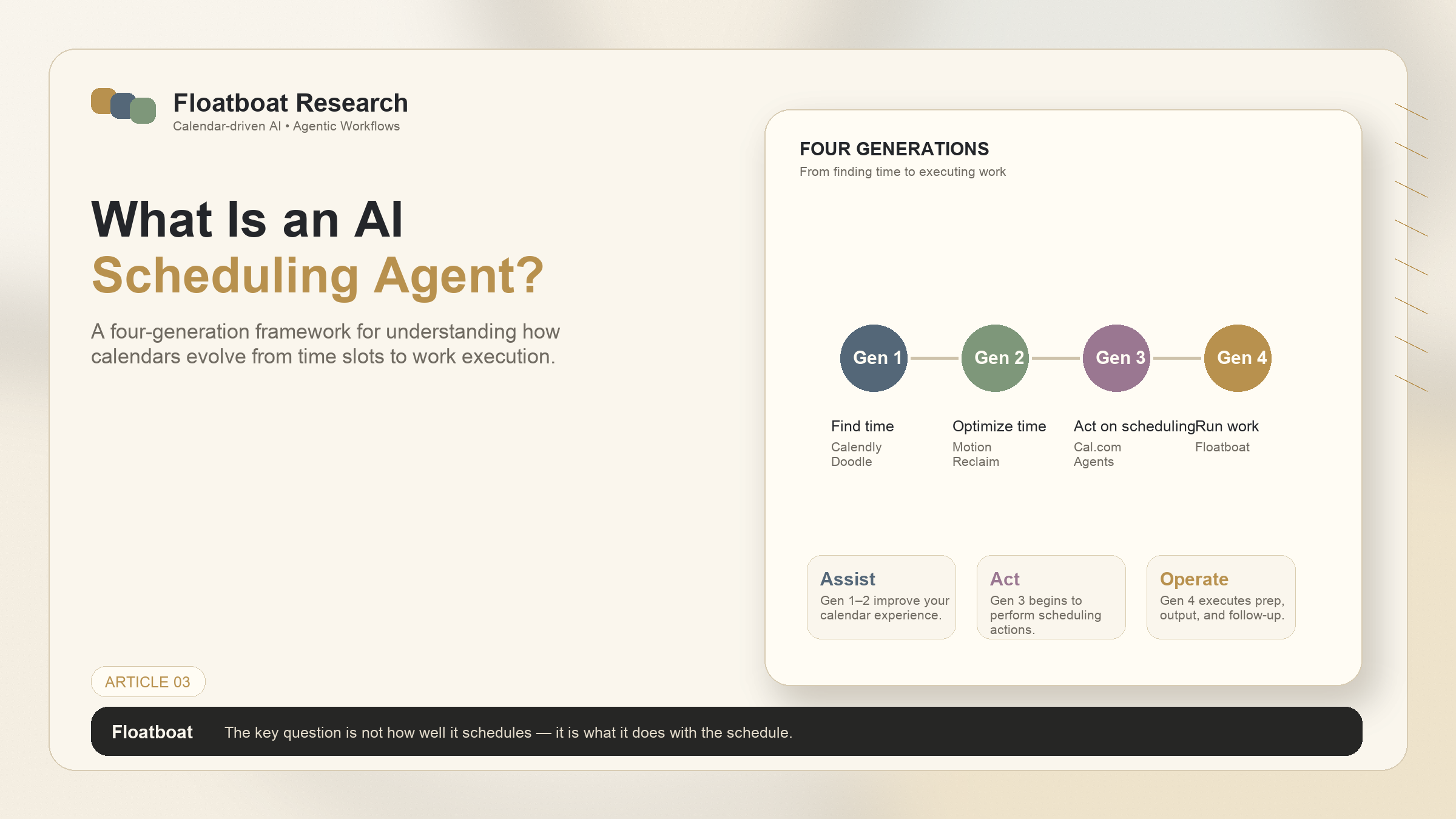
AI scheduling assistants fall into four generations: smart schedulers (find time), AI optimizers (prioritize and rearrange), scheduling agents (add context and execution), and calendar-driven agent OS (autonomous prep-to-follow-up).
The best tool depends on what you need the AI to do: just book meetings, optimize your day, or actually execute work from your calendar.
Calendly remains the standard for simple scheduling. Motion and Reclaim are strong Gen 2 optimizers. Agentic Calendars and Cal.com Agents are pushing into Gen 3 territory. Floatboat is designed around the Gen 4 calendar-driven agent OS pattern.
For solo founders and anyone whose calendar runs their business, the generation gap between Gen 2 and Gen 4 isn't about features — it's about whether the AI waits for you or acts on your behalf.
1. The Scheduling Problem That AI Is Solving
1.1 Why Calendars Are Still Broken
Calendars are simultaneously the most-used and least-evolved productivity tool in the knowledge worker's stack. Email clients have added snooze, scheduling, AI composition, and smart categories. Document editors have added real-time collaboration, AI drafting, and version history. Task managers have sprouted Kanban boards, dependencies, and automations.
Calendars, for most users, still look like they did in 2010. A grid. Colored blocks. Maybe a notification 10 minutes before. The innovation that has happened — smart scheduling links, AI-powered rescheduling — has stayed within a narrow lane: making it easier to fill the grid. What happens with the time once it's filled has been left almost entirely to the human.
That's starting to change. A new wave of AI scheduling assistants is expanding the definition of what a calendar tool can do — from finding time slots to optimizing work patterns to, in the most advanced cases, actually executing the work that the calendar implies. The market is fragmented, the categories are blurry, and the labels ("AI scheduling assistant," "smart calendar," "calendar agent") are used interchangeably by tools that do fundamentally different things. This article provides a framework for making sense of the landscape, then compares the major tools within it.
1.2 What "AI Scheduling" Actually Means in 2026
The phrase "AI scheduling assistant" covers a spectrum so wide it risks meaning nothing. At one end: a tool that scans your calendar for open slots and generates a booking link. At the other: an agent operating system that runs your entire workday from the calendar, autonomously prepping for meetings, executing on deadlines, and following up after calls. Both are technically "AI scheduling assistants." The difference in what they do is substantial.
For a deeper treatment of this evolution, see our full breakdown of the four generations of AI scheduling. The short version, necessary for the comparisons that follow: the four generations are distinguished not by whether they use AI, but by what the AI is asked to do. Gen 1 finds time. Gen 2 optimizes time. Gen 3 adds context and execution. Gen 4 runs work from the calendar autonomously. Most tools on the market today live in Gen 1 or Gen 2. A handful are pushing into Gen 3. Among the tools reviewed here, Floatboat is the clearest example of Gen 4.
2. The Four Generations of AI Scheduling
Understanding the generation a tool belongs to tells you more than any feature list. It tells you what problem the tool was designed to solve — and, by extension, what problems it was never designed to address.
2.1 Gen 1: Smart Schedulers (Calendly, Doodle)
Gen 1 tools solved the availability problem. Before Calendly launched in 2013, scheduling a meeting meant email ping-pong: "Tuesday at 3?" "No, Thursday at 11?" "That doesn't work, how about Friday?" Calendly replaced that with a link. You set your availability once; the other person picks a slot. The coordination layer is automated.
Doodle took a different approach — group polling — that's particularly useful for finding a time that works for multiple people without anyone needing to share their full calendar. Both tools do one thing well: they get events onto your calendar efficiently.
What Gen 1 tools do not do: anything with the event once it's booked. A Calendly link fills your calendar. It doesn't prepare you for what's on it. Your calendar is full and you are no more ready for the meetings on it than you were before.
Best for: Anyone who books external meetings regularly and wants to eliminate scheduling email. The category standard. If your only scheduling problem is "people can't see when I'm free," Gen 1 solves it completely.
2.2 Gen 2: AI Optimizers (Motion, Reclaim, Clockwise, Morgen)
Around 2019, a new class of tools began asking a better question: not "when are you free?" but "what should you be doing right now?" Gen 2 tools use AI to understand your work patterns — when you're most productive, which tasks have approaching deadlines, how meetings should be arranged to minimize context switching — and automatically rearrange your calendar accordingly.
Motion is the most ambitious of the Gen 2 tools. It replaces your calendar and task manager with an AI scheduler that dynamically prioritizes and reorders your day. If a meeting gets canceled, Motion reshuffles your tasks to fill the gap. If a deadline approaches, the relevant task rises to the top. The AI makes thousands of micro-decisions about what goes where.
Reclaim takes a different approach: it integrates with your existing Google Calendar rather than replacing it, and focuses on defending time for habits, tasks, and breaks. Its Smart 1:1 feature automatically finds recurring meeting times that work for both parties across changing schedules. Reclaim's strength is in protecting deep work and personal routines within an existing calendar, rather than rebuilding the calendar from scratch.
Clockwise is team-focused. It analyzes everyone's calendars and automatically moves meetings to create blocks of uninterrupted focus time. Its value proposition is organizational: fewer fragmented schedules, more contiguous deep work blocks. For teams where meeting fragmentation is the primary productivity drain, Clockwise addresses it directly.
Morgen is the newest major Gen 2 entrant, offering a unified calendar across multiple accounts (Google, Outlook, iCloud), task management integration, and an AI Planner that provides daily scheduling recommendations. Its calendar consolidation layer is particularly useful for people juggling personal and work calendars across different platforms, and the AI Planner adds a light optimization layer without the full calendar takeover that Motion performs.
Best for: People with multiple internal meetings per day who need their calendar to actively protect focus time. The Gen 2 tools have matured to the point where the optimization job is solved; choosing between them is about integration preferences and how aggressively you want the AI to rearrange your day.
2.3 Gen 3: Scheduling Agents (Agentic Calendars, Cal.com Agents)
Gen 3 is where the category begins to expand beyond time-slot management. Gen 3 tools don't just find or optimize time — they begin to act on what the calendar contains.
Agentic Calendars reads incoming emails and automatically books appointments from them — an agent that watches your inbox and acts on scheduling requests without human routing. It's a narrow but real example of autonomous calendar action: the trigger is an email arriving, the output is a confirmed event on your calendar, and no human touched the routing decision.
Cal.com Agents represents a different architectural bet: rather than building one scheduling agent, Cal.com built an open platform where developers can create scheduling agents that live in Slack, Telegram, CLI, API, and other environments. The agents handle natural language scheduling requests — "book a 30-minute call with the design team next Tuesday" — and are designed to be embedded wherever teams already work. It's infrastructure for scheduling agents rather than a single agent product.
Both tools represent a shift from "optimize the calendar" to "act on the calendar's behalf." They're still largely reactive — responding to external triggers like incoming emails or explicit scheduling commands — but they're doing something Gen 2 tools don't: executing actions rather than making recommendations.
Best for: Teams that want scheduling to happen without anyone manually managing availability. Cal.com Agents particularly suits development teams that want to embed scheduling into their existing tools. Agentic Calendars suits individuals and small teams drowning in scheduling email.
2.4 Gen 4: Calendar-Driven Agent OS (Floatboat)
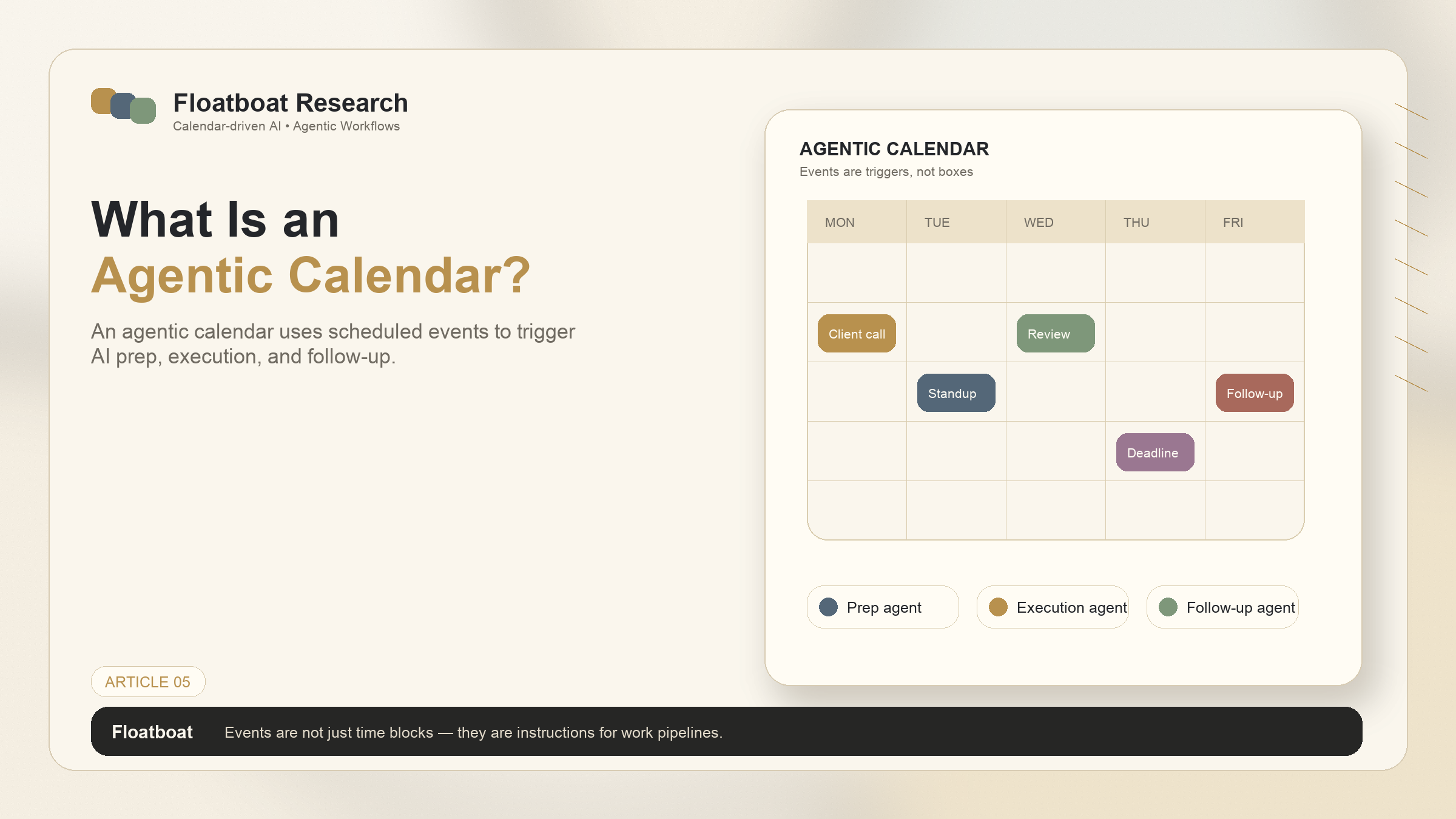
Gen 4 represents the leap from scheduling to execution. Floatboat treats the calendar not as a grid to be optimized but as a runtime that drives work forward. When a client call appears on the calendar, the system doesn't remind you — it gathers relevant emails, surfaces the latest document drafts, and prepares a brief. When the call ends, it extracts action items and drafts follow-ups. When a deadline approaches, it begins assembling deliverables.
The architectural distinction is that every calendar event gets a persistent workspace with its own files, run history, and model choice. The system doesn't just tell you what's on your calendar; it does the prep work, the follow-up work, and the execution work that the calendar implies. It's proactive — acting on the schedule without being prompted — rather than reactive.
For a full definition of this category, see What Is an Agentic Calendar?. For the purposes of this comparison, the key distinction is that Gen 4 is the only generation where the AI autonomously executes work — not just schedules it, not just optimizes it, not just acts on booking requests, but prepares, produces, and follows up across the full lifecycle of every calendar event.
Best for: Solo founders, solopreneurs, and anyone whose calendar is the central nervous system of their work — where the gap between knowing something is scheduled and being ready for it is measured in lost output.
3. Head-to-Head: AI Scheduling Assistants Compared
3.1 Comparison Table
Official references for verification: pricing and capabilities change frequently. Check each vendor's official pricing and documentation pages before purchase: Calendly pricing, Doodle pricing, Motion pricing, Reclaim pricing, Clockwise pricing, Morgen pricing, and Cal.com pricing.
Tool | Generation | Core Capability | Calendar Integration | Best For | Starting Price |
|---|---|---|---|---|---|
Calendly | Gen 1 | Automated availability sharing and booking links | Google, Outlook, iCloud | External meeting booking | Free / $10/mo |
Doodle | Gen 1 | Group polling for multi-person scheduling | Standalone, Google, Outlook | Finding group meeting times | Free / $6.95/mo |
Motion | Gen 2 | AI task prioritization and dynamic calendar rescheduling | Google, Outlook (replaces native calendar) | Individuals wanting full AI scheduling | $19/mo |
Reclaim | Gen 2 | AI habit/task/meeting time defense within existing calendar | Google Calendar (integrates, doesn't replace) | Protecting deep work within existing workflow | Free / $8/mo |
Clockwise | Gen 2 | Team calendar optimization, focus time creation | Google Calendar | Teams with meeting fragmentation | Free / $6.75/mo |
Morgen | Gen 2 | Multi-calendar unification + light AI Planner | Google, Outlook, iCloud, CalDAV | Multi-platform calendar users | Free / $9/mo |
Agentic Calendars | Gen 3 | Inbox-reading agent that auto-books appointments | Google, Outlook | Email-to-calendar automation | Contact for pricing |
Cal.com Agents | Gen 3 | Open platform for embeddable scheduling agents | Google, Outlook, iCloud, CalDAV | Developers embedding scheduling anywhere | Free / $15/mo |
Floatboat | Gen 4 | Calendar-Driven Proactive Agent OS — autonomous prep, execution, follow-up | Google, Outlook, iCloud, Lark, ICS feeds | Solo founders, solopreneurs needing calendar-driven execution | Free / contact sales |
3.2 Smart Schedulers: Best for Simple Booking
If your only problem is the scheduling back-and-forth, Gen 1 tools are the right answer. They're mature, reliable, and inexpensive. Calendly has the deepest integration ecosystem and the most polished booking experience. Doodle remains the best option for group polling — finding a single time that works for five people is genuinely hard to do manually, and Doodle handles it elegantly.
The limitation of Gen 1 tools is that they stop at the moment of booking. They're excellent at getting events into your calendar and useless at helping you with what those events demand. For someone whose calendar is a secondary tool — a place to track external meetings while the real work happens elsewhere — this is fine. For someone whose calendar is the primary organizing structure of their work, Gen 1 is infrastructure, not a solution.
3.3 AI Optimizers: Best for Team Time Management
The Gen 2 category is the most competitive — several well-executed tools with overlapping but distinct approaches. Motion is the most comprehensive for individuals: if you want an AI to run your entire schedule with minimal input, it's the strongest Gen 2 option. The trade-off is that it replaces your calendar rather than augmenting it, which requires commitment.
Reclaim is the better choice if you want to stay in Google Calendar but add AI scheduling intelligence on top. Its habit and task defense features are particularly well-executed, and the Smart 1:1 scheduling solves a genuinely annoying recurring problem. Clockwise is the right pick for teams where meeting fragmentation is the bottleneck — its value is proportional to team size. Morgen's multi-calendar consolidation and lighter-touch AI Planner make it the best entry point for someone who wants Gen 2 benefits without the full calendar overhaul.
The ceiling for all Gen 2 tools is the same: they optimize the arrangement of tasks and meetings on a calendar, but they don't execute any of the work those tasks and meetings represent. A perfectly optimized calendar is still a calendar full of things you need to do — you're just doing them in a smarter order.
3.4 Scheduling Agents: Best for Autonomous Booking Workflows
Gen 3 is the smallest and newest category, with two tools taking notably different paths. Agentic Calendars is purpose-built for a specific workflow — turning inbound scheduling emails into booked meetings without human intervention — and executes that workflow well. Cal.com Agents is the more ambitious architectural play, creating an open platform where scheduling agents can be built and embedded across environments.
Both tools can reduce the manual overhead of scheduling, but neither addresses the full lifecycle of calendar-driven work. They handle the booking or rescheduling of an event; they don't handle what happens before or after it. Gen 3 is a bridge generation — tools that cross the line from calendar management to calendar action, but don't yet cover the full prep-to-follow-up pipeline.
3.5 Emerging: Calendar-Driven Agent OS
Gen 4 is the newest category in this framework, and Floatboat is designed specifically around this pattern. The defining characteristic is that the system doesn't just manage the calendar — it executes work from it. The calendar event is both the trigger and the context. The AI acts before you sit down and follows up after you stand up.
This category is most relevant for people whose work is calendar-structured — solo founders, consultants, freelancers, executives — where the volume of preparation and follow-up across recurring events creates a genuine execution bottleneck. For someone with three meetings a week, the difference between Gen 2 and Gen 4 is marginal. For someone with 15 client calls, it's transformative.
4. How to Choose the Right AI Scheduling Assistant
4.1 By Team Size and Use Case
The simplest decision framework starts with two questions. First: what's your primary scheduling pain? If it's the back-and-forth of finding times, start with Gen 1. If it's fragmented days and context-switching, look at Gen 2. If it's the manual overhead of preparing for and following up after every event on your calendar, you need Gen 4.
Second: are you an individual or a team? Clockwise and Doodle are explicitly team-first. Motion, Reclaim, and Floatboat are individual-first but work for small teams. Calendly works for both. Agentic Calendars and Floatboat are particularly suited to solo operators whose calendar volume makes manual prep unsustainable.
4.2 By Integration Requirements
Integration breadth matters if your tools are spread across multiple platforms. If you live entirely in Google Workspace, almost every tool on this list will work well. If you use a mix of Google, Outlook, iCloud, and Notion Calendar, fewer tools cover the full range — Morgen and Floatboat have the broadest native calendar support. If you need the scheduling tool to connect to your CRM, email, task manager, and file storage automatically, without relying entirely on external automation layers, the Gen 3 and Gen 4 tools are the only options that treat integrations as a core architectural feature rather than a settings panel.
4.3 By Automation Depth: Assisted vs Autonomous
The deepest distinction in the market isn't between tools — it's between tools that assist you and tools that act on your behalf. Gen 1 and Gen 2 are assistants. They make recommendations, optimize arrangements, send reminders. They improve your calendar experience. But you still do the work.
Gen 3 begins to shift this — Agentic Calendars books meetings without you. Cal.com Agents handles scheduling requests without you. These are autonomous actions, but they're confined to the scheduling domain.
Gen 4 extends autonomy across the work lifecycle. The system prepares briefs, gathers context, generates follow-ups, and tracks action items — none of which requires you to initiate anything. The calendar itself drives the work. For someone managing a high volume of calendar-structured work, this autonomy isn't a luxury feature; it's the difference between spending hours on prep and spending those hours on the work that only you can do.
5. FAQ
5.1 What's the difference between a smart scheduler and a scheduling agent?
A smart scheduler (Gen 1–2) optimizes time-slot placement — it finds open slots, prioritizes tasks, rearranges your calendar for efficiency. A scheduling agent (Gen 3–4) acts on the calendar's contents — it books meetings from emails, prepares briefs before calls, extracts action items after. The smart scheduler answers "when"; the scheduling agent answers "what happens because of when."
5.2 Can AI scheduling assistants handle multi-timezone teams?
Most Gen 1 and Gen 2 tools include timezone handling as a core feature. Calendly, Doodle, and Morgen handle multi-timezone scheduling well. Gen 2 tools like Motion and Reclaim automatically account for timezone differences when optimizing. For Gen 3 and Gen 4 tools, timezone awareness extends beyond scheduling to context — the system accounts for which participants are in which timezone when preparing meeting materials.
5.3 Do these tools integrate with Google Calendar and Outlook?
Yes, with varying coverage. Calendly, Motion, Reclaim, Clockwise, and Agentic Calendars support Google and Outlook. Morgen adds iCloud and CalDAV. Floatboat is designed to support major calendars and work calendars including Google, Outlook, iCloud, Lark, and ICS feeds, while connecting calendar events to a broader agent workspace layer. If you're on a less common calendar platform, check the specific tool's integration page before committing, as Outlook support in particular varies between read-only and full two-way sync across different tools.
5.4 Are AI scheduling assistants worth it for solo founders?
Gen 1 tools (Calendly, Doodle) are essentially mandatory — the time savings on scheduling email alone justifies the free tier. Gen 2 tools are valuable if you struggle with context-switching or use your calendar as a de facto task manager. Gen 4 is the most directly relevant for solo founders: when you're the entire company, every client call requires prep that nobody else will do, every meeting produces action items that nobody else will track, and every deadline requires materials that nobody else will assemble. A Gen 4 tool automates the prep and follow-up work, leaving the founder to do the strategic work that actually moves the business forward.
6. Related Reading
What Is an AI Scheduling Agent? — The full four-generation evolution, with deeper analysis of each generation's architecture and limitations.
What Is an Agentic Calendar? — The foundational definition of the Gen 4 category and the technology stack behind it.
Calendar-Driven AI vs Chat-Based AI — How the calendar-driven and chat-based AI paradigms differ at the design philosophy level.
Get automation tips for your workflow
Weekly insights for non-technical professionals. No spam ever.