
What Gemini 3.5 Integration Means for Solo Operators
Gemini 3.5 integration can change how solo operators handle long-context, repetitive, and Google-heavy work. Learn when to use it.
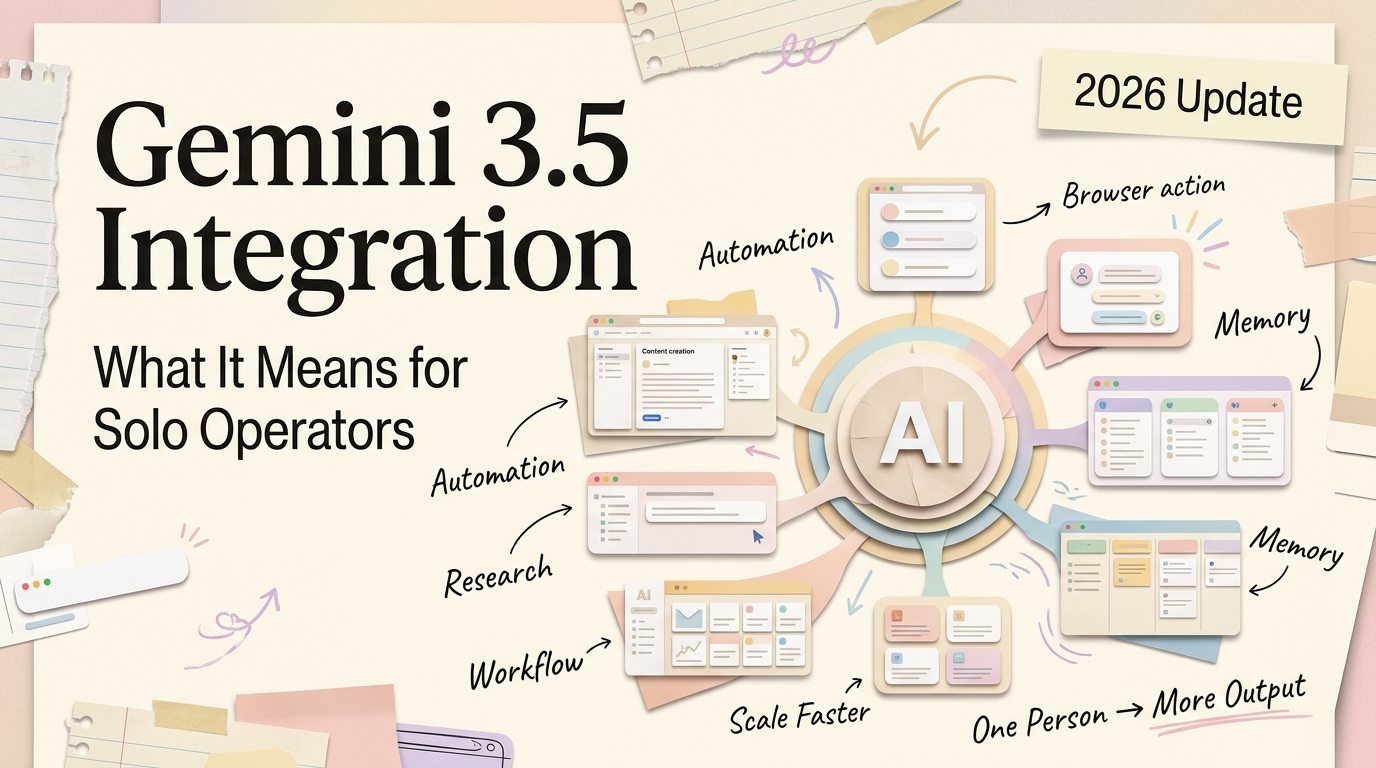
Hello, I'm Nova. Gemini 3.5 Flash dropped last week, and if you're running a one-person operation with AI already in your workflow, the real question isn't "is it good" — it's whether this Gemini 3.5 integration actually changes how you get work done, or just adds another model to manage. I spent a few days testing it on my actual tasks — long documents, content drafts, data extraction — and here's what I'd tell a friend who asked me whether it's worth switching.Gemini 3.5 Flash dropped last week, and if you're running a one-person operation with AI already in your workflow, the real question isn't "is it good" — it's whether this Gemini 3.5 integration actually changes how you get work done, or just adds another model to manage. I spent a few days testing it on my actual tasks — long documents, content drafts, data extraction — and here's what I'd tell a friend who asked me whether it's worth switching.
What the Gemini 3.5 Integration Actually Adds
Real capability changes: long context, speed, cost, and practical workflow impact
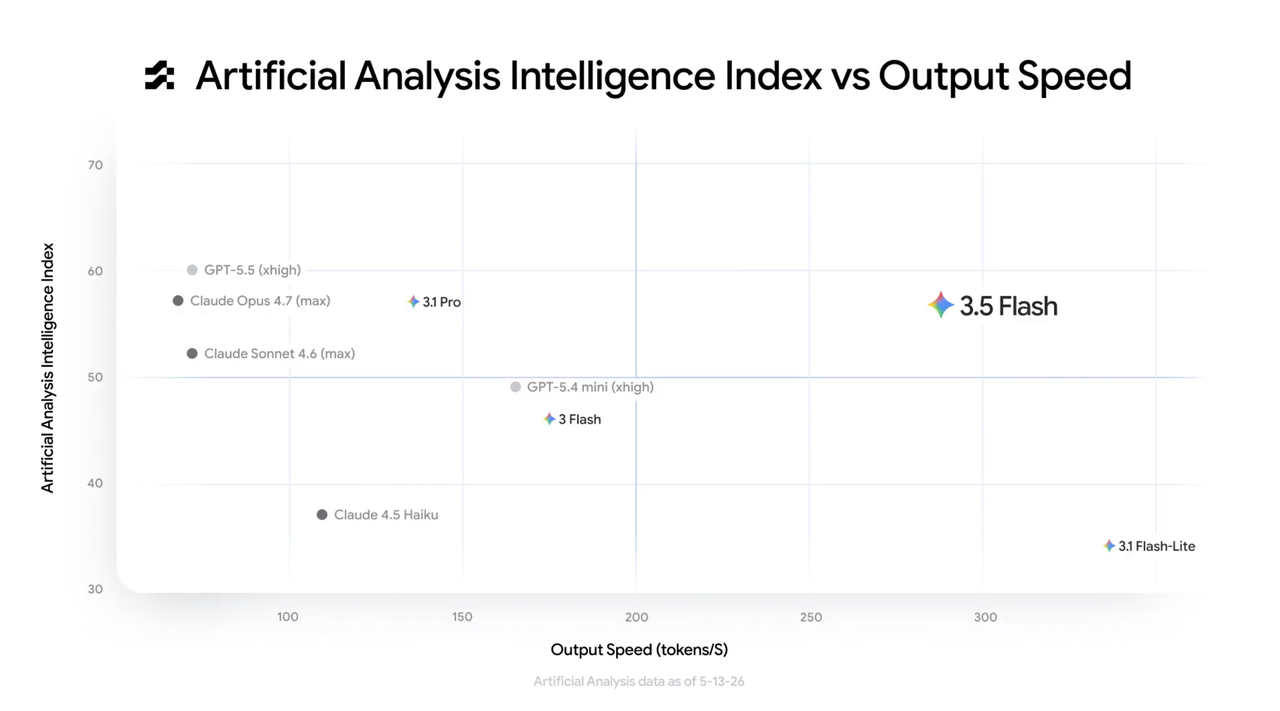
Gemini 3.5 Flash launched on May 19, 2026, and according to Google's official announcement, it's built around "frontier intelligence with action." The key specs: a 1 million token context window, pricing at $1.50 per million input tokens and $9.00 per million output tokens, and what Google claims is 4x faster output than comparable frontier models.
The context window is the part that matters for daily work. One million tokens means you can feed it an entire codebase, a full research report, or hours of meeting transcripts in a single pass. For the kinds of document-heavy tasks I do — pulling insights from long PDFs, synthesizing research — skipping the chunking step is a genuine time-saver. That step just… worked.
Speed-wise, I ran a few side-by-side comparisons on a 15-page brief. Gemini 3.5 Flash came back noticeably faster. Whether that holds across more complex tasks, I'm still figuring out.
Key differences from Claude and GPT without turning this into a model benchmark
I'm not going to do a full Gemini vs Claude for work comparison — benchmarks rarely reflect what it feels like to use a model on a Tuesday afternoon when you need a client email drafted.
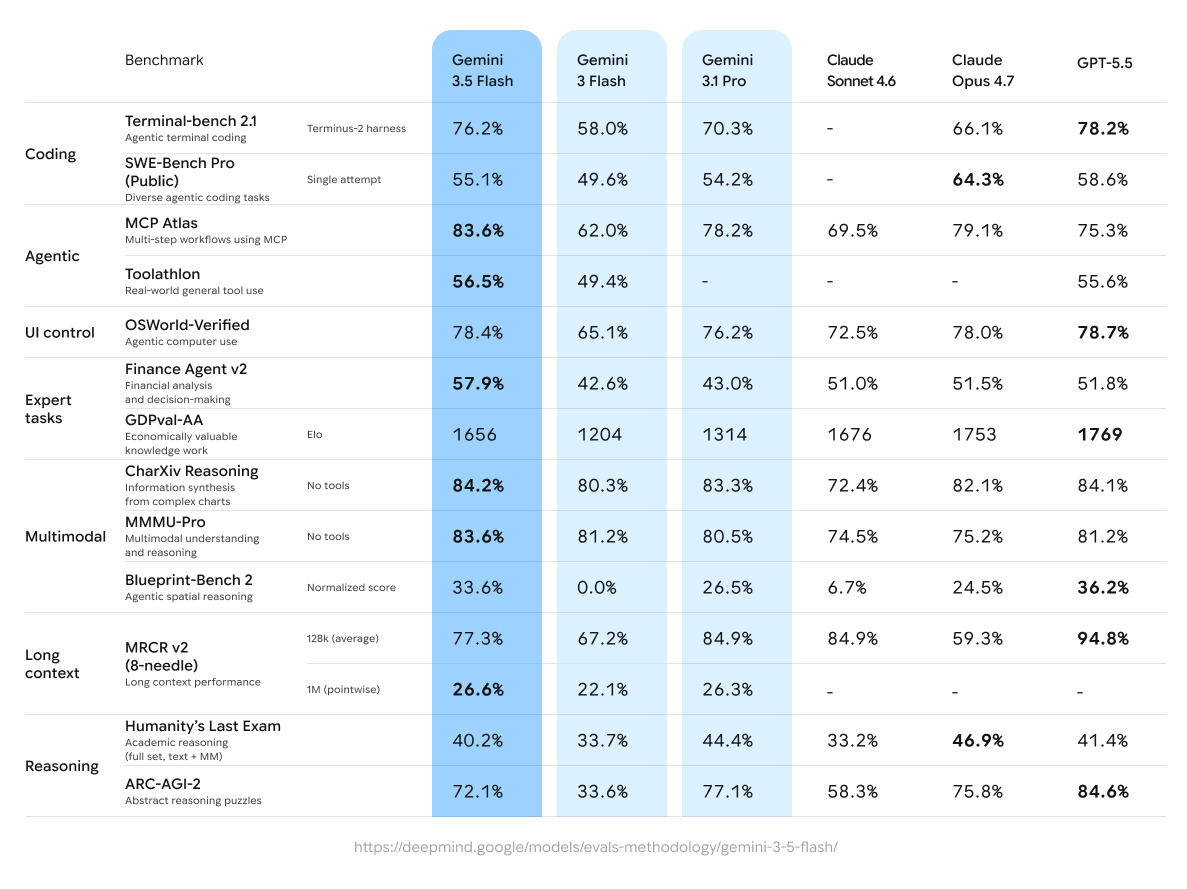
What I've noticed in practice: Gemini 3.5 Flash is strong at structured extraction and agentic tasks — where the model plans, calls tools, and iterates. It scored 76.2% on Terminal-Bench 2.1 and 83.6% on MCP Atlas for tool-use reliability, as documented in Google's Gemini models page. For nuanced writing, I still lean toward Claude. Different strengths, different slots.
What This Changes for Solo Operator Workflows
Research and long-document tasks
This is where Gemini 3.5 for solo founders gets interesting. If your work involves digesting long documents — contracts, research papers, competitor analysis — the 1M token window means you stop spending time splitting documents into chunks. You just drop the whole thing in.
I tested this with a 40-page market research PDF. Dropped it in, asked for a structured summary. The output was coherent through the entire document — it didn't lose the thread halfway. Okay, that's actually pretty clever.
Cost-sensitive repetitive tasks
If you're running repetitive tasks through an API, cost matters. According to Google's API pricing page, Gemini 3.5 Flash comes in roughly 40% cheaper than Gemini 3.1 Pro while outperforming it on most coding and agentic benchmarks. For a solo operator watching every dollar, that math is worth noticing.
I want to be careful not to overstate this though. Per-token cost only matters if the output quality is good enough that you're not spending extra time editing. Three out of five times on my content tasks, the output was solid. The other two needed cleanup.
Google Workspace-heavy workflows
If you live inside Google Docs, Gmail, and Calendar, Gemini 3.5 has a structural advantage. It's the default model in the Gemini app now. The Google Cloud I/O 2026 blog highlighted deep Workspace integration — including Daily Brief, which pulls Gmail, Calendar, and task priorities into a single morning summary. I haven't tested Daily Brief myself yet, but the concept solves a real problem I have every morning.
When to Turn It On and When to Leave It Off
Tasks worth testing with Gemini 3.5
Long-document analysis — anything over 20 pages where context matters. Structured data extraction — invoices, survey responses, competitor pricing tables. High-volume API tasks — where pricing differences compound at scale.
Tasks that may work better with your current model
Nuanced writing with a specific voice. Highly creative generation. Anything where you've already built detailed custom prompts for another model. Switching means re-tuning, and that's not free.
Hidden costs of model switching: decision burden and context fragmentation
Here's the thing nobody talks about enough: every model you add is a decision you have to make every time you sit down to work. Which model for this task? Where did I save my best prompts? Is this the one that handles tables well?
For a solo operator, that cognitive overhead adds up fast. I used to think more tools meant more productivity. I don't anymore.
The Bigger Issue: Do You Need Multiple Models at All?
The overhead of managing multiple AI models alone
Running a multi-model AI workspace solo means maintaining prompt libraries across platforms, remembering which model handles what, and context-switching between interfaces. It's not efficient unless you have very clear, non-overlapping use cases for each model.
Consolidation first, optimization second
Before adding Gemini 3.5 to your stack, ask what you'd remove. If the answer is "nothing, I'd just add it," that's a signal to pause.
When multi-model workflows are actually worth it
There are legitimate cases: one model for long-context research, another for writing. But only if the performance gap on your actual tasks is large enough that maintaining two systems costs less than the time you save. Be honest about whether you have the problem this tool is solving.
How to Actually Use Gemini 3.5 Integration in Your Workflow
The simplest Gemini 3.5 integration path: if you're already in the Gemini app or Google AI Studio, 3.5 Flash is the default — no setup needed. For API access, the model ID is gemini-3.5-flash.
If you're using an AI workspace that supports multiple models, the more interesting move is routing Gemini 3.5 to specific task types rather than replacing everything. For example, I've been testing it inside Floatboat, which recently added Gemini 3.5 Flash as a model option — so I can run long-document research through Gemini while keeping Claude for writing tasks, all in the same workspace without switching tabs. That kind of model routing is where multi-model setups actually start making sense instead of just adding complexity.
A quick decision framework before switching for any task: Is the context window a bottleneck? If yes, the 1M tokens might solve it. Is cost the primary constraint? Compare per-token pricing at your actual volume. Have you already optimized prompts for another model? Factor in re-tuning time. If two or more answers point toward switching, test it. If only one does, stay put.
Should You Flip the Switch?
Gemini 3.5 Flash is legitimately strong — fast, cost-effective, and particularly good at long-context and agentic tasks. As CNBC's coverage of Google I/O 2026 noted, Google is positioning this as a centerpiece of its AI strategy, with Gemini 3.5 Pro expected next month.
But for anyone evaluating AI tools for a one-person business, the question about any Gemini 3.5 integration was never "is this model good?" It's: does adding this to my workflow save more time than it costs to manage? If you work with long documents, run batch tasks, or live inside Google Workspace — worth testing. If your setup is humming along and your bottleneck isn't the model itself, wait.
That's my honest take. You'll have to decide what's right for your situation.
FAQ: Gemini 3.5 Integration Common Questions
Should I switch from Claude or ChatGPT to Gemini 3.5 Flash?
Not as a full replacement — each model has different strengths. Gemini 3.5 Flash leads on speed, cost, and long-context tasks. Claude still edges ahead on careful writing and code review accuracy. GPT-5.5 leads on deep reasoning. Most solo operators I've seen end up routing different task types to different models rather than picking one winner.
Is Gemini 3.5 Flash free to use?
In the Gemini app and AI Mode in Google Search, yes — it's the default model at no cost. API access is paid: $1.50 per million input tokens, $9.00 per million output tokens. Cached input drops to $0.15 per million, which matters a lot if you're running repetitive tasks on the same source material.
Can Gemini 3.5 handle long PDFs and full documents in one go?
Yes. The 1M token context window supports roughly several hundred thousand words in a single pass. I tested it on a 40-page PDF and the output held together through the entire document. That said, I haven't pushed it past ~100 pages yet, so I can't speak to the limits on very large inputs.
Is it worth adding Gemini 3.5 if I already use an AI workspace with multiple models?
Only if it fills a gap your current setup doesn't cover — like long-context research or cheaper batch processing. Adding a model without removing one usually means more decision overhead with marginal quality gains. Ask yourself what you'd take out of your workflow before putting something new in.
When is Gemini 3.5 Pro coming out?
Google confirmed at I/O 2026 that Gemini 3.5 Pro is in internal testing and expected to ship in June 2026. No exact date yet. If your work is reasoning-heavy and you can wait a few weeks, it may be worth holding off before committing to a full workflow change.
Previous Posts:
• AI Workflow for Solo Founders: What Actually Saves Time? — Before adding another model to your stack, map the workflow you're trying to improve first.
• AI Workflow for Solo Operators: The Difference Between Demos and Daily Work — A practical look at where AI workflows break once they leave the demo stage.
• AI Workspace Agents: Why Chat Windows Stop Scaling — Managing multiple models becomes easier when work happens inside one workspace instead of scattered tabs.
• Workspace Agents vs Chat Assistants: What's Actually Different? — The difference matters when you're deciding whether another model belongs in your workflow.
• How One-Person Businesses Work Like a Team With AI — Adding another model only helps if it removes a real bottleneck in how a solo business operates.
Get automation tips for your workflow
Weekly insights for non-technical professionals. No spam ever.