
Effort Control and Fast Mode for AI Work
Effort Control helps solo operators decide when AI should think harder, move faster, or stay lightweight for repeated work.

Claude Opus 4.8 dropped yesterday with Effort Control, and I've only had a few hours with it — so this is early impressions, not a verdict. The default move is to crank effort up on everything important and leave Fast Mode for "later." Both instincts cost you more than they save — in tokens, in time, and in the kind of decision fatigue that quietly drains a one-person operation. Hi, I'm Nova, and I want to share how I actually decide which level of AI model effort to use for what, including the tasks where I now reach for Fast Mode without thinking twice.
Quick context: I'm not testing this from a lab. I run my own content workflow, and Claude is in the middle of it. So this is from a few dozen real sessions, not benchmarks.
Most people use AI effort backward
Here's the pattern I noticed in myself first, then in two friends who also run solo operations: we crank effort up on the wrong tasks.
Sorting fifty links into rough buckets? Max effort. "Just in case it gets it perfect."
Reviewing a contract paragraph that actually matters? Default. "It'll be fine."
That's exactly backward. The contract paragraph is where slow, careful reasoning earns its keep. The link-sorting is where you'd happily trade a 2% quality drop for finishing in a quarter of the time.
I think this happens because we don't have a real intuition for what "effort" costs until we feel it — in tokens, in latency, in the slow drag of waiting on something that didn't need the wait.
What Effort Control actually means
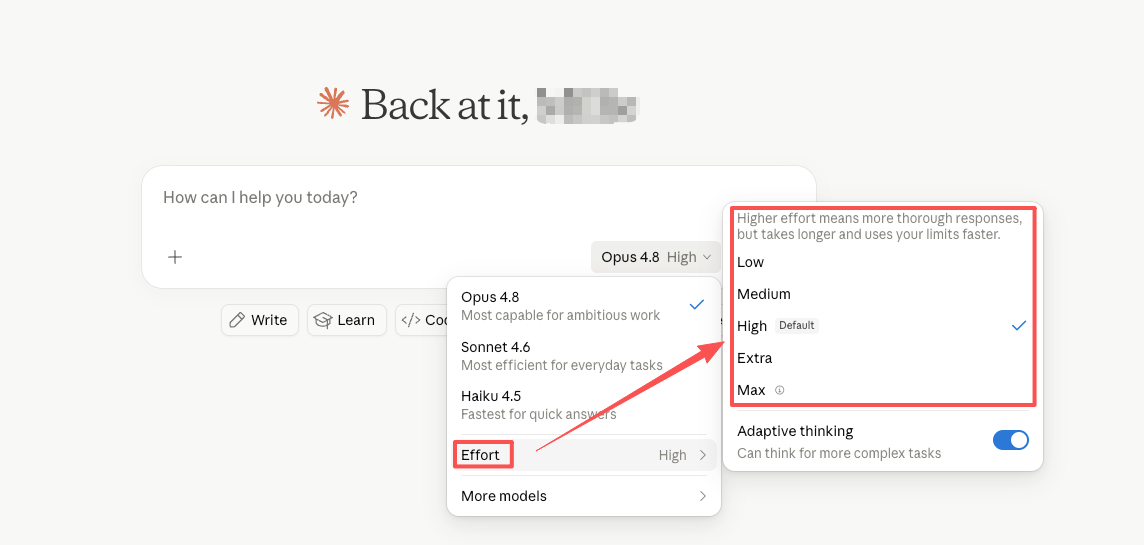
Effort Control is the new selector that sits next to the model picker on claude.ai and Cowork. As Anthropic describes it in the launch announcement, a new control alongside the model selector lets users choose how much effort Claude puts into a response. On higher effort settings, Claude will think more frequently and more deeply to give better responses.
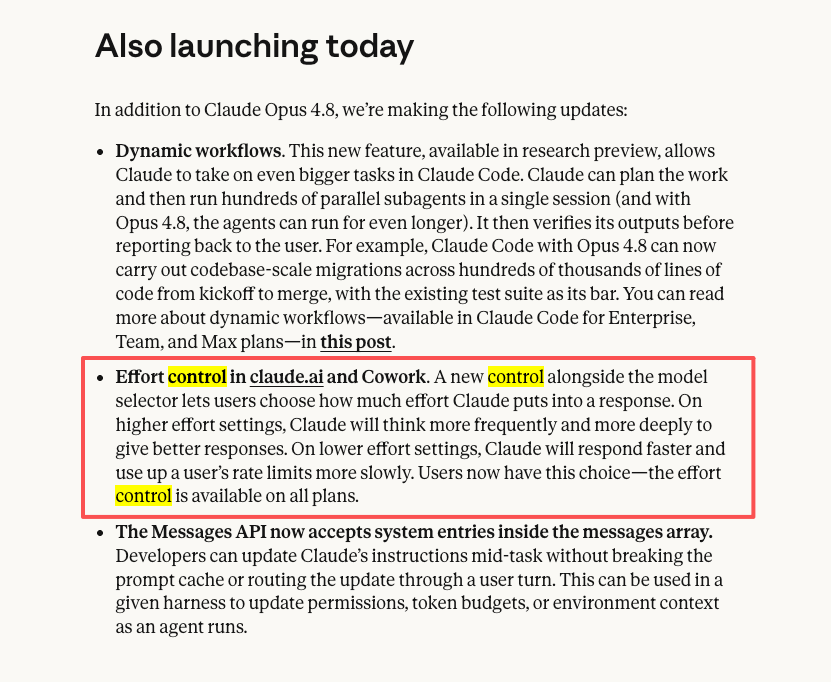
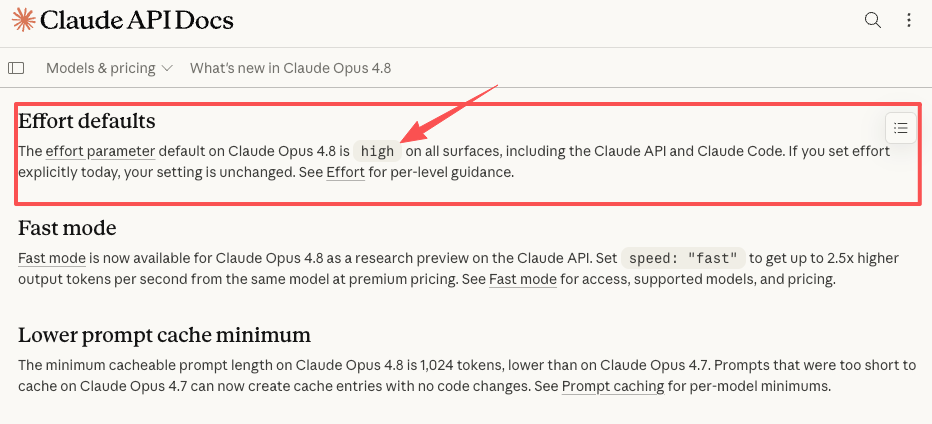
On lower effort settings, Claude will respond faster and use up a user's rate limits more slowly. The levels go from low through high (the default), extra, and max. Opus 4.8 defaults to high effort, which we judge to be the best overall balance of quality and user experience.
Fast Mode is a different lever. It's a speed knob, not a thinking knob. Set speed: "fast" to get up to 2.5x higher output tokens per second from the same model at premium pricing. It's currently a research preview on the API and inside Claude Code.
The thing worth knowing: you can combine them. Fast Mode + low effort is the configuration I now use for the most repetitive parts of my day — and it's the one I almost didn't think to try.
When higher effort is worth it
Higher effort earns its keep when the cost of getting something almost right is higher than the cost of waiting a bit longer. That sounds obvious, but it's a useful filter.
Complex planning, review-heavy work, long-context tasks
Three places where I now reach for extra or max effort:
The first is anything that touches a decision I'd hesitate to walk back. Pricing changes. Positioning shifts. A response to a difficult client email. These are tasks where an extra minute of thinking saves me an hour of cleanup later.
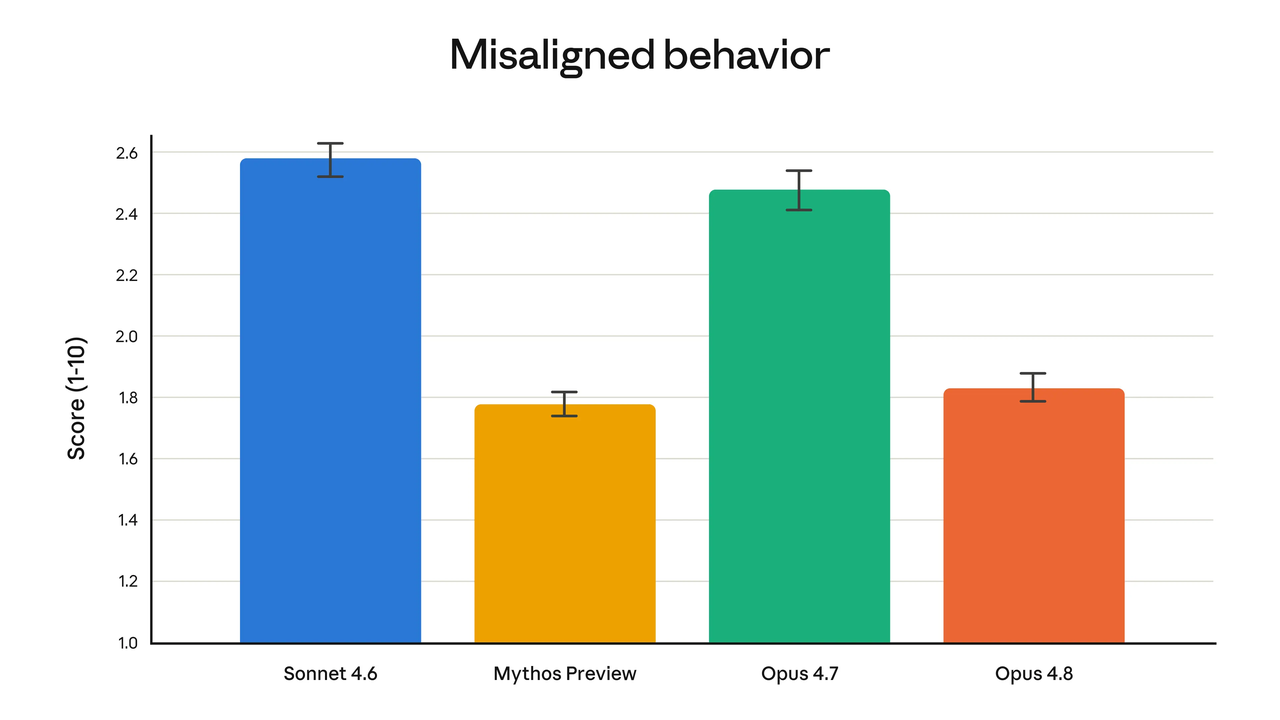
The second is review work — places where I want Claude to actually read what's in front of it carefully and push back. The new model is noticeably better at this. According to Anthropic's release notes, Opus 4.8 is four times less likely than Opus 4.7 to let flaws in its own generated code pass without comment. That's a useful pattern even outside code — anywhere I want the model to surface concerns rather than nod along.
The third is long-context work where the whole document has to hold together. If I'm asking Claude to synthesize a research dump or stitch together notes from a long conversation, low effort gives me something that looks coherent in the first paragraph and drifts by the third. High or extra effort holds the thread.
Honest caveat: I haven't pushed max effort on enough tasks to have a strong opinion on when it beats extra. So far, extra has been the level that gives me the biggest jump in quality. Max feels more situational.
When Fast Mode or lower effort makes more sense
Here's the part I was slow to figure out.
Drafting, sorting, repetitive low-risk tasks
A surprising amount of my AI work is low-stakes pattern matching. Sorting links. Drafting subject lines. Tagging notes. First-pass outlines I'm going to rewrite anyway. Pulling action items out of a meeting transcript.
For all of these, lower effort is genuinely fine. The output is good enough on the first try, and when it isn't, I catch it in the edit pass I was going to do regardless.
This is where Fast Mode actually shifts something. When I'm running a sequence of small tasks — sort, draft, tag, summarize — the latency adds up. Fast Mode at lower effort makes that whole sequence feel like a conversation instead of a series of waiting rooms.
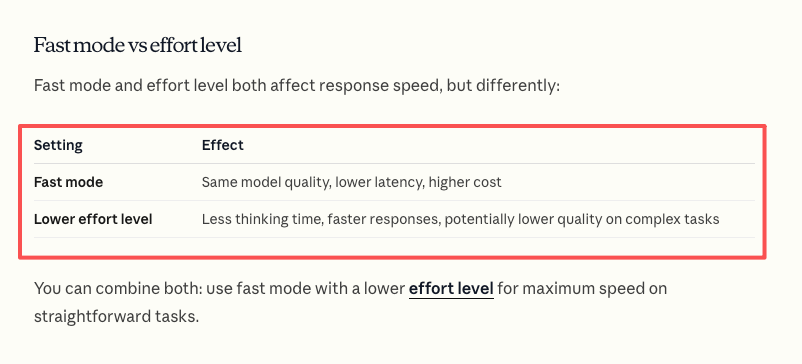
The Claude Code docs put it well: Fast mode is best for interactive work where response latency matters more than cost. That matches my experience. The tasks where I notice Fast Mode are the ones where I'm bouncing back and forth — not the ones where I send one big prompt and walk away to make coffee.
One thing to be careful about: when you switch into fast mode mid-conversation, you pay the full fast mode uncached input token price for the entire conversation context. So decide at the start of a session, not in the middle of one.
The hidden cost: decision fatigue
Token cost is the obvious cost. It's the one people write about. But for a one-person operation, the cost I've come to care about more is decision fatigue — the small, constant mental tax of choosing a setting for every task.
If I have to pick an effort level for every prompt, I won't. I'll just default to high and pretend I'm being thoughtful. That's the trap.
The way I've gotten around this is by batching. I now group my work into two or three "modes" during the day, and I pick one effort setting per mode. Low-effort mode in the morning for sorting and drafting. High or extra in the afternoon for the work that needs real thinking. That's it. Two decisions a day instead of forty.
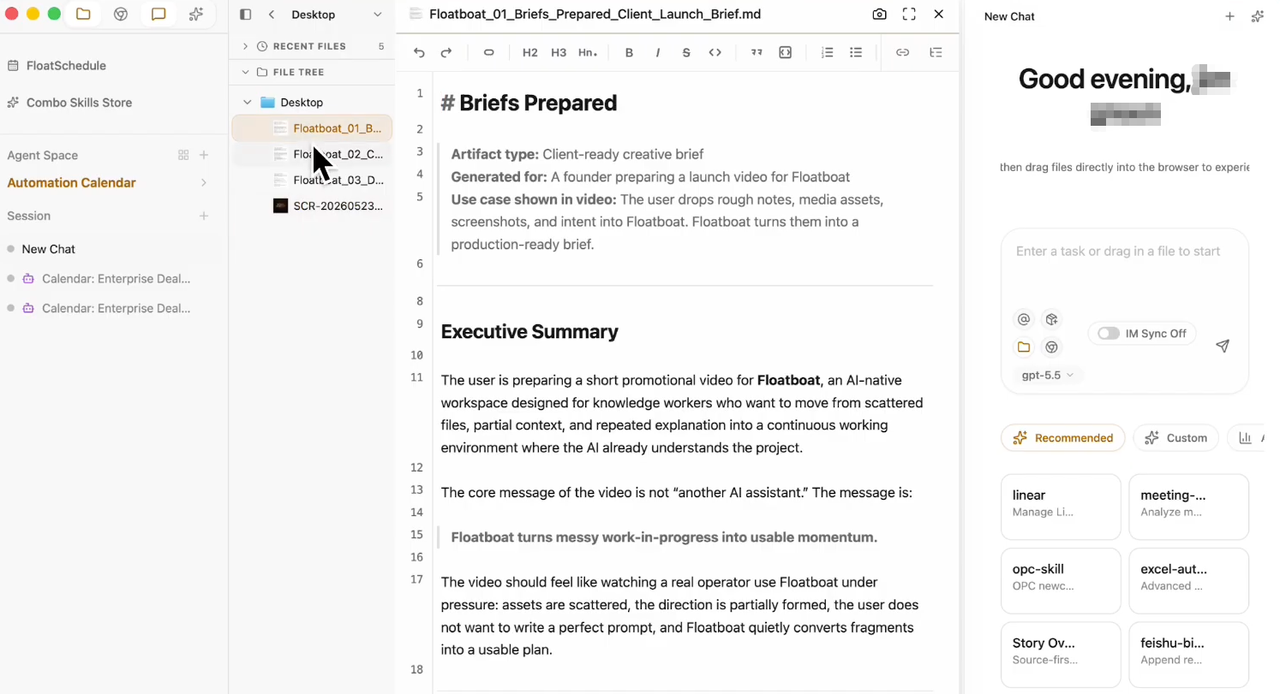
This is roughly the same pattern that proactive agent OS tools like Floatboat are trying to automate at the workflow level — letting one upfront decision drive a chain of downstream execution. I'm doing it manually inside Claude, but the underlying idea is the same: stop making the same micro-decision over and over.
A simple task-to-effort framework
The framework I actually use, written out:
Low effort + Fast Mode: Anything I'd happily skim-edit afterward. Drafts, sorts, tags, summaries, first-pass outlines. The cost of being slightly off is low because I'm going to touch it again anyway.
Default (high) effort: Most one-shot tasks where I want a finished answer and don't want to think about it. Email responses, analysis I'll use directly, anything I'd hand to a smart assistant without checking their work line by line. Worth noting that Opus 4.8 defaults to high effort across all surfaces, so if you've never touched the setting, this is where you already are.
Extra effort: Anything where being wrong has a real downstream cost. Important reviews, complex reasoning, multi-step planning, long-context synthesis.
Max effort: I leave this for the rare task where I genuinely don't know if the model can do it at all, and I want every advantage. I don't use it often.
The discipline isn't picking the right level on any one task. It's not defaulting to "more is better." More effort on a sorting task doesn't sort things better — it just takes longer and uses more of your rate limit on work that didn't need it.
FAQ
What is Effort Control in Claude?
It's a setting on claude.ai and Cowork that lets you choose how much thinking Claude does on a given response. Higher levels make the model think more carefully and use more tokens; lower levels respond faster and use your rate limits more slowly. It's available on all plans. Please check the official Anthropic documentation for the most current details on availability and behavior.
How should I choose an AI effort level for a task?
The shortcut I use: ask whether being slightly wrong on this task would actually cost me anything. If the answer is no — it's draft work, sorting, summarizing, something I'll edit anyway — lower effort is fine. If being wrong would mean rework, a bad decision, or a hard-to-walk-back conversation, that's where higher effort pays for itself. Don't try to decide per-prompt. Batch your work into a couple of modes and pick one setting per mode.
When should I avoid using maximum effort?
Anywhere the task isn't actually hard. Max effort on simple sorting, tagging, or drafting doesn't make the output better — it just makes you wait longer and burns through your rate limit on work that didn't need it. I'd save max for tasks where I genuinely don't know if the model can succeed and I want every advantage. For everyday hard tasks, extra has been enough for me.
Can effort settings replace human review?
No, and I'd be cautious of anyone suggesting otherwise. Higher effort makes Claude more likely to catch its own mistakes and push back on flawed reasoning, but "more likely" isn't "always." For anything that touches money, legal exposure, client commitments, or published work, I still review the output myself. Effort Control changes how good the first draft is — it doesn't remove the need for the last pass.
That's where I've landed. I'll probably keep adjusting — the framework that works in May might not be the one that works in August, especially as Fast Mode comes out of research preview and the surrounding tools change. But the core insight has stuck: the question isn't how to get Claude to think harder. It's when not to.
Back to it.
Previous Posts
How to Scale a One-Person Business Without Hiring
Claude Managed Agents: What They Mean for Solo Companies
AI Doesn't Know How You Work — That's the Real Problem
Get automation tips for your workflow
Weekly insights for non-technical professionals. No spam ever.