
Calendar-Driven AI vs Chat-Based AI — Two Different Paradigms
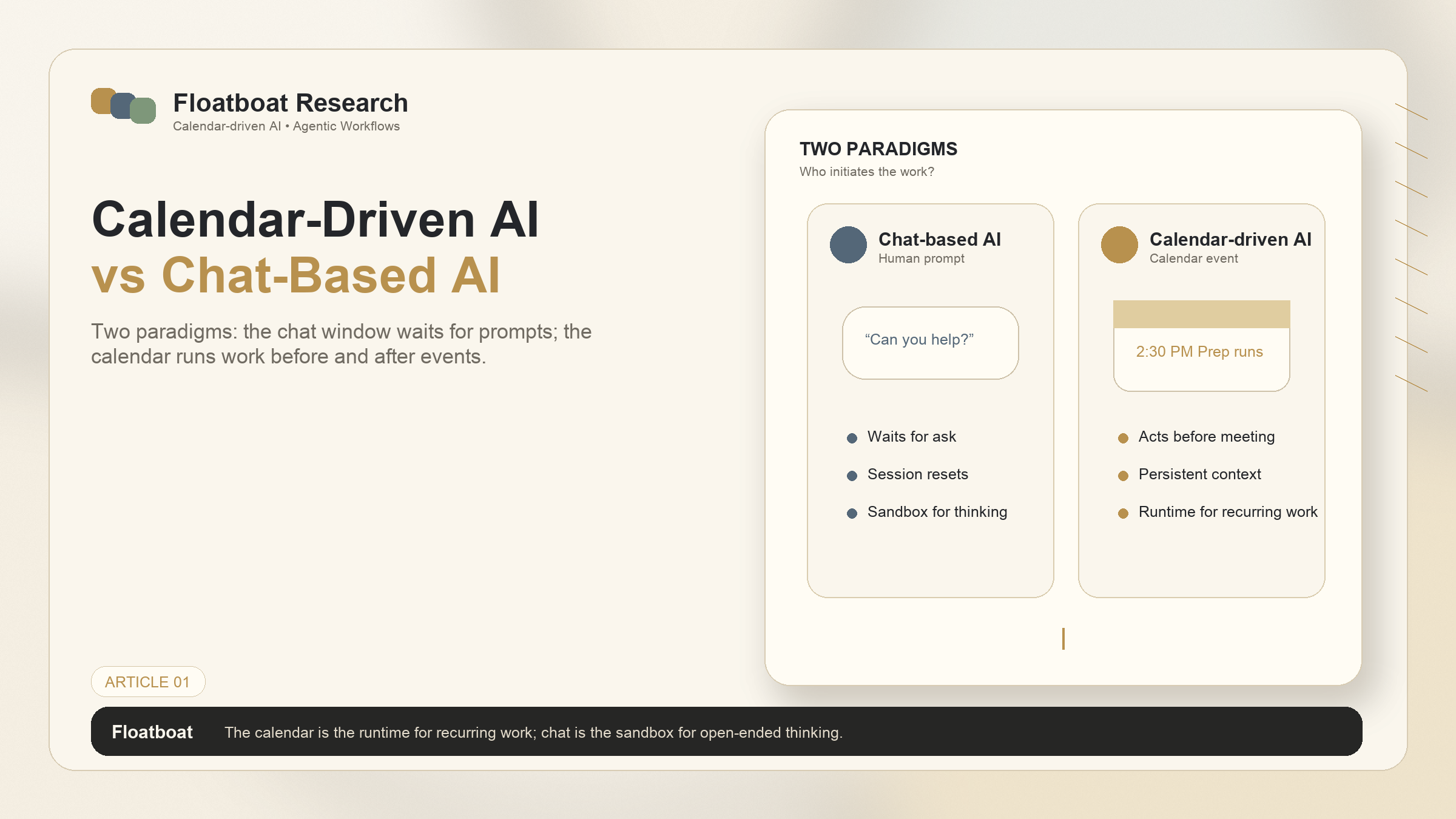
Calendar-driven AI and chat-based AI represent fundamentally different design philosophies. Compare how they differ on workflow, proactivity, and who initiates the interaction.
disclosure: "This article discusses two AI interaction paradigms. Floatboat operates in the calendar-driven paradigm. Chat-based tools mentioned include ChatGPT, Claude, and Gemini. All capability descriptions are based on publicly available documentation as of June 2026."
TL;DR
Calendar-driven AI and chat-based AI differ at the design-philosophy level — not in features or quality, but in who initiates the interaction and what the system considers its primary trigger.
Chat-based AI waits for you to ask. Calendar-driven AI runs on your schedule, acting before you sit down and following up after you stand up.
Neither paradigm is universally better. Chat-based AI excels at creative exploration, deep research, and ad-hoc problem solving. Calendar-driven AI excels at recurring workflows, deadline-driven tasks, and the meeting lifecycle.
The two can coexist — the decision isn't which to use, but which to use for what. The calendar is the runtime for recurring work; the chat window is the sandbox for open-ended thinking.
If you're new to the concept of agentic calendars and calendar-driven AI, What Is an Agentic Calendar? provides the foundational definition. This article focuses on the comparison between the two interaction paradigms.
1. Two Ways AI Shows Up to Work
1.1 The Chat Window: AI Waits for You
The dominant paradigm of AI since ChatGPT launched in late 2022 has been the chat interface. You open a window, type a prompt, and the AI responds. The interaction is conversational, turn-based, and session-bounded. When you close the window, the AI stops. When you open it again tomorrow, it doesn't know what you discussed yesterday unless you tell it.
This paradigm has been extraordinarily successful. It maps to how humans communicate. It's intuitive — no training required. And it's flexible: the same interface handles everything from "explain quantum computing" to "write a condolence email" to "debug this Python function." The chat window is a universal surface. Its strength is its generality.
But its limitation is structural, not incidental. A chat-based AI can only act when prompted. It has no sense of time — no awareness that it's 8:52am and your 9am standup is approaching with an unfinished action item from last week. It doesn't know your schedule exists unless you paste it in. The relationship is: you pull information from the AI. The AI never pushes work to you.
1.2 The Calendar: AI Runs on Your Schedule
Calendar-driven AI inverts the relationship. Instead of you opening a tool and asking it to do something, the calendar event itself triggers the AI to act. At 2:30pm — thirty minutes before your client call — the system has already gathered relevant emails, surfaced the latest proposal draft, and prepared a one-page brief. You didn't ask. The calendar told it to.
This isn't a chat window with calendar integration bolted on. It's a fundamentally different architecture. The calendar is the interface. Events are the prompts. Time is the trigger. The AI doesn't wait for you to remember that you have a meeting and then scramble to prepare; it's already run the prep pipeline by the time you look at your screen.
The design philosophy shift can be summarized in one question: who initiates? In chat-based AI, the human initiates every interaction. In calendar-driven AI, the system initiates — responding to time and schedule, not to typed instructions.
2. What Calendar-Driven AI Actually Means
2.1 Proactive, Not Just Responsive
Most AI tools are responsive by design. They react to input. Calendar-driven AI is proactive: it anticipates what work needs to happen before a scheduled event and begins that work autonomously. The distinction matters because it changes when and how work happens.
In a responsive model, preparation is something you do. You sit down 15 minutes before a meeting, open your notes, find the relevant documents, refresh your memory on the client's history, and jot down talking points. In a proactive model, preparation is something that happens to you — the materials appear, assembled and organized, without your intervention. You still need to review them. You still make the strategic decisions. But the assembly work — the finding, the formatting, the cross-referencing — is handled before you arrive.
2.2 Calendar Events as Triggers, Not Just Time Slots
In a traditional calendar, an event is a container: a title, a time range, maybe a location and some attendees. The system treats all events the same way — they're blocks on a grid. A client pitch at 3pm and a dentist appointment at 4pm are structurally identical to Google Calendar. They're both "busy."
Calendar-driven AI treats events as semantically distinct. A client pitch triggers a different preparation pipeline than a standup, which triggers a different pipeline than a project deadline. The event type — inferred from the title, attendees, recurrence pattern, and your past behavior — determines what the AI does. This isn't natural language processing of event titles as a gimmick; it's a routing layer that maps calendar semantics to work pipelines. The event is the instruction. Different events produce different agent behaviors, automatically.
2.3 The Runtime Metaphor: Calendar as OS
The framing that best captures calendar-driven AI is the operating system metaphor. Your computer's OS doesn't wait for you to tell it to run a background process — it runs disk cleanup, checks for updates, indexes files, all without your involvement. The calendar, in a calendar-driven AI system, plays the same role. It's the runtime that schedules and executes work processes. The events are the cron jobs. The AI agents are the processes.
This metaphor is useful because it clarifies what calendar-driven AI is not. It's not "an AI assistant that can access your calendar." That's a feature added to a chat interface. Calendar-driven AI is an architectural choice: the calendar is the primary execution environment, not a data source that happens to be connected.
3. The Chat-Based Paradigm
3.1 Strengths: Flexibility, Conversational Depth, Exploration
Chat-based AI is genuinely excellent at what it does. Its greatest strength is flexibility: the same interface handles creative brainstorming, technical debugging, research synthesis, and emotional support with equal fluency. You can pivot mid-conversation from "draft a cold email" to "actually, let's think about whether cold email is the right channel for this audience." The conversational format supports exploration and refinement in a way that structured, trigger-based systems cannot.
This flexibility extends to depth. A chat session can spiral into a two-hour deep dive on a single topic, with the AI maintaining context throughout, challenging assumptions, and building on earlier exchanges. For open-ended thinking — strategy development, creative ideation, troubleshooting novel problems — the chat paradigm is hard to beat.
The chat interface also lowers the barrier to entry. Everyone knows how to have a conversation. There's no configuration, no workflow setup, no learning curve beyond understanding what the AI can and can't do. You type. It responds. The simplicity is the point.
3.2 Limitations: Reactive-Only, Session-Based, Context Resets
The structural limitations of chat-based AI are the mirror image of its strengths. Because it only acts when prompted, it cannot handle work that needs to happen on a schedule. It cannot prepare for your 9am meeting unless you ask it to — at which point you're already managing the preparation yourself. It cannot follow up after a deadline passes unless you return to the window and initiate the conversation. Time doesn't exist in the chat paradigm except as something you mention in a prompt.
Sessions also reset. Each new conversation starts from zero context unless you deliberately carry information forward — copying text, summarizing previous exchanges, re-establishing the background. This is manageable for ad-hoc tasks. It's exhausting for recurring work. If you have 15 client calls per week, explaining the context for each one — who the client is, what the last conversation covered, what's at stake — becomes the work itself.
The chat paradigm also creates a remembering burden. You have to remember to open the window. You have to remember what to ask. You have to remember what context to provide. The AI remembers nothing across sessions. The human becomes the integration layer between the AI and the rest of their tools. For one-off tasks, this is fine. For work that recurs on a schedule, it's a failure mode.
4. Head-to-Head: Same Scenario, Different Approaches
The difference between paradigms is easiest to see in specific scenarios. What follows are three everyday work situations, with how each paradigm handles them.
4.1 Scenario 1: Preparing for a Client Call
You have a call with an existing client at 3pm. The last conversation with them was two weeks ago, covering three open items. One of those items has since been resolved; two remain. There's a proposal draft in your Google Docs that you've been iterating on. There are two email threads from the past week that are relevant — one from the client asking about timeline, one internal about pricing.
In the chat-based paradigm, you open your AI tool at 2:45pm. You type something like: "I have a client call in 15 minutes. Here's the context: [paste email threads]. Here's the proposal: [paste document]. Can you summarize the open items and suggest talking points?" The AI does this well — it's good at summarization. But you had to find the emails yourself. You had to locate the right version of the proposal. You had to remember to open the AI tool at all. The AI helped, but you orchestrated.
In the calendar-driven paradigm, at 2:30pm — triggered by the calendar event — the system has already identified the client from the event attendees, found the relevant email threads, located the proposal document, cross-referenced with the previous meeting's notes, and assembled a one-page brief. It appears in your workspace. You review it, make adjustments if needed, and walk into the call prepared. The orchestration was handled by the calendar event, not by your memory and initiative at 2:45pm.
4.2 Scenario 2: Following Up After a Team Standup
Your daily standup ends. Three action items were discussed: you need to review a PR, Sarah needs updated Figma files, and the deployment timeline needs adjustment. In a typical workflow, someone types these into Slack or a task tracker. Then they sit there until each person acts on them — or, more commonly, until someone follows up.
In the chat-based paradigm, you could paste the standup notes into the AI and ask it to format action items. You could even ask it to draft Slack messages for each person. But you have to initiate this. And the AI doesn't track whether the action items were completed, because it has no concept of time passing between sessions.
In the calendar-driven paradigm, the standup event ending triggers the follow-up pipeline. Action items are extracted from the meeting context and assigned to the relevant people. Draft messages are prepared. When the next standup approaches, the system surfaces the unfinished items from the previous one — without anyone having to remember or manually track them. The calendar maintains continuity across time.
4.3 Scenario 3: Managing a Project Deadline
A project deliverable is due Friday. Throughout the week, you need to review drafts, incorporate feedback, finalize formatting, and prepare the handoff documentation. The work involves multiple tools: a design file in Figma, a draft in Google Docs, feedback in Slack threads, a checklist in Notion.
In the chat-based paradigm, each time you work on the project, you open the AI and provide context: where things stand, what needs to happen next, what the latest feedback was. The AI helps with each session. But the thread connecting Monday's session to Wednesday's session exists only in your head — or in the document you maintain to track progress.
In the calendar-driven paradigm, the deadline event on Friday triggers a countdown workflow. Each day leading up to the deadline, the system surfaces relevant materials, checks for new feedback in connected channels, and updates a status summary. By Friday morning, the final-prep pipeline has already gathered everything needed for the handoff. The deadline didn't just appear on your calendar; it drove a week of incremental preparation.
5. When Each Paradigm Fits Best
5.1 Chat-Based AI Excels At: Creative Exploration, Deep Research, Ad-Hoc Problem Solving
If your work involves open-ended thinking — developing a strategy, brainstorming product ideas, researching a novel topic, debugging an unfamiliar system — the chat interface is the right tool. Its flexibility lets you follow threads wherever they lead. Its conversational format supports the kind of back-and-forth that produces insight. And the lack of time-awareness is actually a feature here: you don't want the AI interrupting your creative flow with a reminder about a standup.
Chat-based AI is also the right choice for tasks that don't follow a schedule. Writing a blog post. Drafting a one-off proposal. Analyzing a dataset you've never seen before. These are work items that appear in your life, not on your calendar. A chat window handles them naturally.
5.2 Calendar-Driven AI Excels At: Recurring Workflows, Deadline-Driven Tasks, Meeting Lifecycle
If your work is structured around a schedule — recurring meetings, client calls, project deadlines, weekly reviews — calendar-driven AI addresses the fundamental friction of that structure: the gap between knowing something is on the calendar and being ready for it when it arrives.
For solo founders and solopreneurs in particular, this gap is expensive. Every client call requires preparation. Every deadline requires materials. Every meeting produces action items that need tracking. Doing this manually means either spending significant time on prep and follow-up — time that could go to actual work — or operating at a lower level of preparation than the situation demands. Calendar-driven AI automates the assembly work, leaving the strategic thinking to the human.
The two paradigms are complementary. Use chat-based AI for exploration and creation. Use calendar-driven AI for execution and follow-through. The calendar isn't replacing the chat window; it's handling the work that the chat window was never designed to do.
6. FAQ
6.1 Can I use both calendar-driven and chat-based AI together?
Yes, and this is likely how most people will work. Calendar-driven AI handles the recurring, schedule-bound work — preparation, follow-up, deadline tracking. Chat-based AI handles the ad-hoc, exploratory work — research, brainstorming, drafting. They address different parts of the workflow. Using both means the scheduled work doesn't get forgotten and the creative work still has a flexible surface.
6.2 Is calendar-driven AI just scheduled prompts?
No. Scheduled prompts run the same instruction at the same time regardless of context. "Every Monday at 9am, summarize my calendar for the week" is a scheduled prompt. Calendar-driven AI adapts its behavior based on the specific event — the attendees, the history, the related documents, the event type. A client call with a new prospect triggers different preparation than a renewal conversation with an existing client. The calendar event provides the trigger; the AI determines what to do based on the event's semantics.
6.3 Which paradigm is better for solo founders?
It depends on the work, not the person. Solo founders typically have a mix of scheduled, recurring work (client calls, investor updates, weekly planning) and unscheduled, exploratory work (product strategy, market research, content creation). Calendar-driven AI handles the first category; chat-based AI handles the second. The ideal setup uses both, with the calendar-driven system ensuring that nothing falls through the cracks and the chat system providing a sandbox for open-ended thinking.
6.4 Does calendar-driven AI need access to my entire calendar?
It needs access to the events you want it to act on. This doesn't necessarily mean every event. Most implementations allow you to select which calendars feed the system — you might connect your work calendar but not your personal one, or connect specific calendars for specific types of automation. The key is that the system needs to read event data (titles, times, attendees, descriptions) to determine what to do. Without calendar access, there are no events to trigger on, and the paradigm collapses back into chat.
7. Related Reading
What Is an Agentic Calendar? — The foundational definition of the category that calendar-driven AI enables.
What Is an AI Scheduling Agent? — The four-generation evolution from smart schedulers to calendar-driven agent OS.
How AI Meeting Prep Actually Works — A concrete walkthrough of what calendar-driven preparation looks like in practice.
Get automation tips for your workflow
Weekly insights for non-technical professionals. No spam ever.