
AI Follow-Up Emails After Meetings
AI follow-up email workflows help turn meetings into drafts, action items, next steps, and reviewable tasks after the call ends.
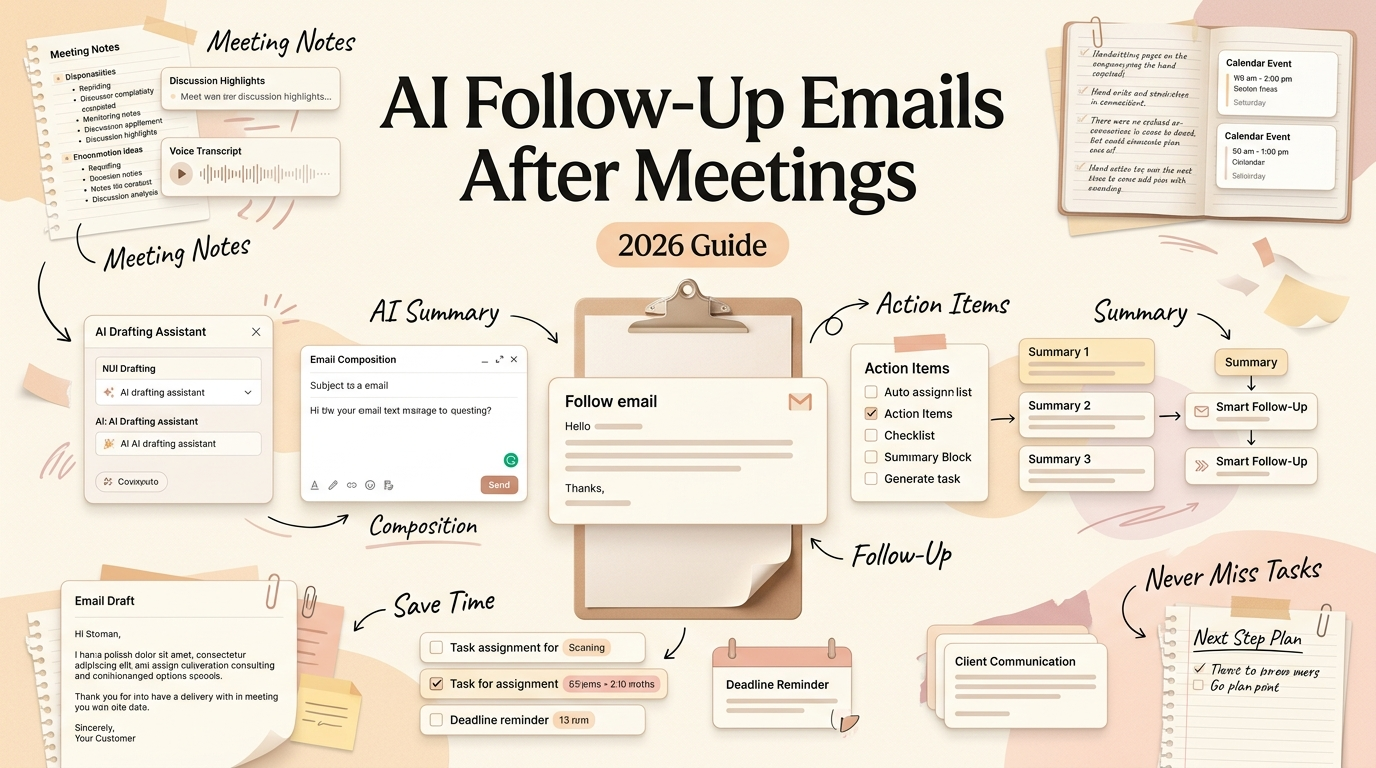
Hello, I'm Nova. An AI follow-up email can draft your post-meeting recap, pull out action items, assign owners, and set deadlines — all before you've finished your coffee. I've been building this kind of workflow into my week for the past couple of months, and the part that surprised me most wasn't the speed. It was how much less I dreaded the end of a meeting.
Here's what I've learned about making meeting follow-up actually work with AI, what still needs a human eye, and why the latest model updates make this more practical than it was even six months ago.
What an AI Follow-Up Email Should Do
A good follow-up email does three things: it confirms what was discussed, it makes next steps visible, and it creates a small amount of pressure to act. That's it. Not a transcript. Not a summary of vibes. Just: what happened, who's doing what, and by when.
The problem is that writing a decent follow-up takes ten to fifteen minutes per meeting — longer if the meeting was messy. Multiply that across five or six calls in a day, and you're losing over an hour to pure admin. For a solo operator or a two-person team, that hour is the difference between shipping something and not.
What I want from an AI follow-up email isn't a template fill. I want something that can read the actual context of a meeting — who said what, which decisions were made, what got deferred — and turn that into an email I'd only need to scan before hitting send.
Why Meeting Follow-Up Fails in Normal Calendars
Your calendar knows a meeting happened. It knows who was invited. But once the meeting ends, the calendar moves on to the next block.
The gap between "the meeting ended" and "the follow-up went out" is where most work falls apart. A Calendly State of Meetings report found that 40% of respondents said they don't receive follow-up notes or action items after meetings. That's not a minor inefficiency — that's nearly half the room leaving without knowing what happens next.
Calendar workflow automation tools like Motion or Reclaim can protect your schedule, but they don't touch what comes after the event. The calendar tells you when. It doesn't help with what now. That's the layer where AI follow-up starts to matter — not as a fancier reminder, but as something that can actually draft the next step.
How AI Turns Meeting Context Into Next Steps
Here's where meeting follow-up AI gets interesting — and where I've been spending most of my testing time.
The basic flow: a meeting transcript (from Otter, Fireflies, Read.ai, or whatever recorder you use) gets fed into an AI model. The model reads the transcript, identifies decisions, extracts action items, and drafts a follow-up email. Some setups can also create tasks in your project tool and set reminders.
I ran this workflow using Claude with a transcript from a 45-minute client call. Pasted in the raw text, gave it a prompt — "Draft a follow-up email with action items, owners, and deadlines based on this transcript" — and waited.
Wait… that's interesting. The draft came back with five action items, attributed to the right people, and it even flagged a decision that had been left ambiguous in the meeting. I read it twice, changed one sentence, and sent it. The whole thing took about three minutes.
That's the version that works. I should also say: when I tried this with a poorly structured meeting — no agenda, lots of tangents, unclear decisions — the output was noticeably weaker. The model pulled out action items, but some were wrong, and the email felt like it was guessing. The quality of the follow-up is directly tied to the quality of the meeting. AI doesn't fix a bad meeting; it just makes the mess visible faster.
Draft Email, Action Items, Owners, Deadlines, and Reminders
The most useful pattern I've landed on breaks the follow-up into layers:
Layer 1: The email itself. A short recap — three to four sentences — plus a bulleted list of next steps. This goes out within an hour of the meeting. The AI drafts it; I review it.
Layer 2: Action items with owners. Each item gets assigned to a person with a deadline. The AI pulls names from the transcript and maps them to tasks. This works about 80% of the time — the other 20% needs manual correction, usually because someone said "I'll handle that" without specifying what "that" was.
Layer 3: Reminders and task creation. This is where action items AI starts to overlap with project management. Some workflows push the action items directly into Notion, Asana, or a simple to-do list. I've been doing it manually for now — copy the items, paste them into my task board — but the pattern is clear enough that automation is the next step. Proactive agent OS tools like Floatboat are building toward exactly this: turning calendar events into executed outcomes, not just documented ones.
The whole point is that the follow-up doesn't live in your memory anymore. It lives in a system. And the system drafts faster than you do.
What Claude Opus 4.8 Signals About Reliable Follow-Up Work
I want to talk about Claude Opus 4.8 here, not because it's the only model that can do this, but because its release tells us something about where this kind of work is heading.
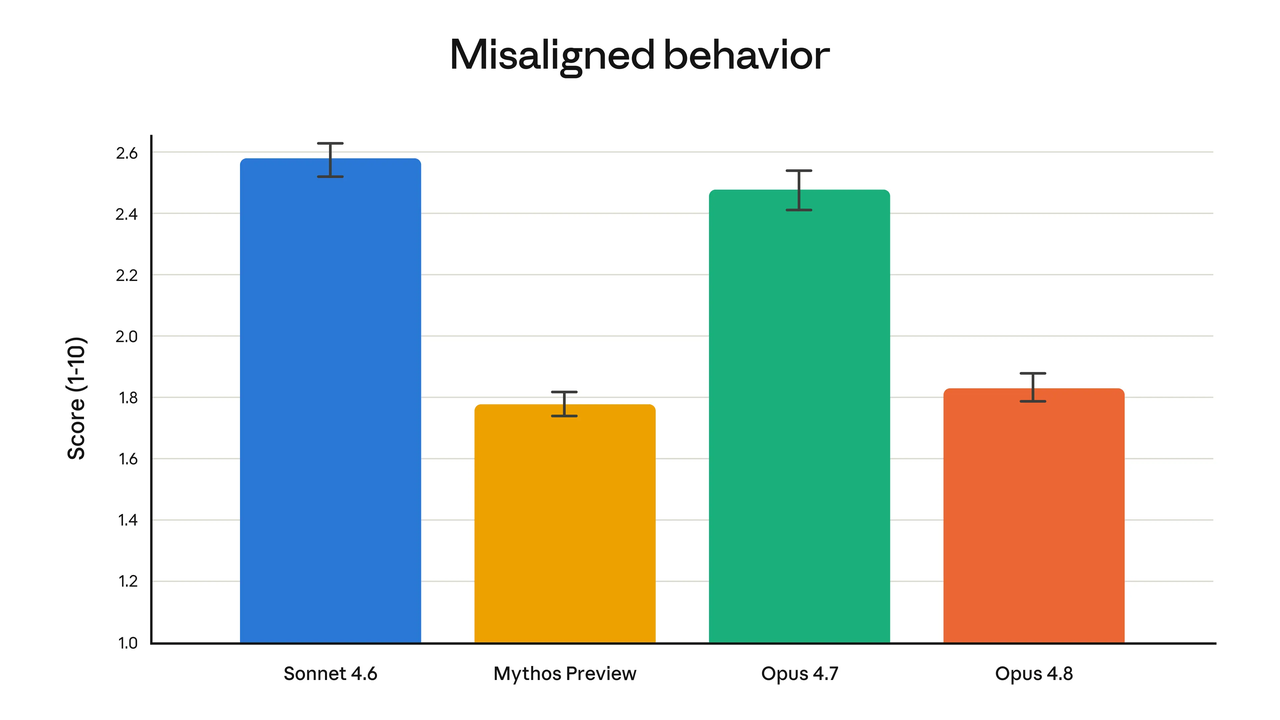
Anthropic announced Opus 4.8 in late May 2026. The headline improvements are in agentic task performance, tool use consistency, and — this is the part that matters for follow-up workflows — reliability over longer tasks. Early testers reported that Opus 4.8 is less likely to make unsupported claims and more likely to flag its own uncertainty. Anthropic's own evaluations suggest the model is roughly four times less likely to leave flaws in its work unremarked compared to its predecessor.
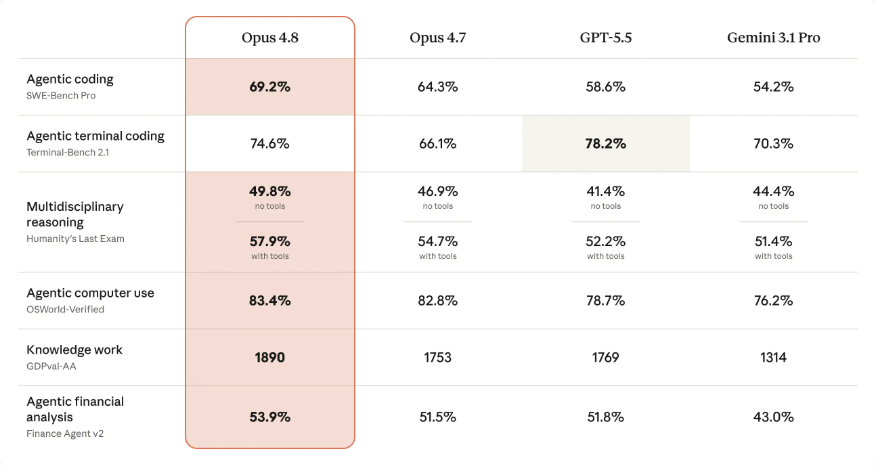
For meeting follow-up, reliability is everything. A draft that invents an action item nobody discussed is worse than no draft at all. The Opus 4.8 benchmark results on agentic coding (69.2% on SWE-Bench Pro) suggest the model handles structured extraction — pulling specific facts from messy text — with more consistency than before.
I've only been using Opus 4.8 for about a week and a half for this specific workflow, so I'm not going to overstate what I've seen. But the outputs feel tighter. Less hallucinated attribution. Fewer phantom deadlines. That step just… worked, more often than it used to.
The broader signal: as models get better at tool use and longer autonomous tasks, the gap between "AI drafts an email" and "AI manages the entire post-meeting workflow" gets smaller. We're not there yet. But the direction is clear.
What Must Stay Human-Reviewed
I'm not going to pretend I send AI-drafted follow-ups without reading them. I don't.
Here's what I always check:
Tone. The model doesn't know your relationship with the recipient. A follow-up to a long-term client and a follow-up to a first-call prospect should read differently. The AI gets the facts right more often than the feel.
Sensitive commitments. If someone agreed to a pricing change, a timeline shift, or a scope adjustment in the meeting, I verify those details against my own notes before the email goes out. The stakes on getting this wrong are too high to skip.
Omissions. Sometimes the most important thing in a meeting is what wasn't said — a question that was dodged, a topic that was avoided. AI won't catch that. You will, because you were in the room.
Even in more advanced setups — where a computer-use agent could theoretically open your email client, paste the draft, and send it — human review stays essential. As Anthropic's computer use documentation notes, this capability is still maturing. I'd treat full automation of meeting follow-ups as a useful prototype, not a finished workflow. At least for now.
How to Make Follow-Up Workflows Reusable
The real time savings don't come from one good follow-up. They come from making the pattern repeatable.
Here's what I've settled into: a saved prompt that takes a transcript and outputs a follow-up email in a specific format. Same structure every time — recap, decisions, action items, deadlines, open questions. I tweak the prompt occasionally, but the bones stay the same.
The prompt is the workflow. It encodes my preferences about length, tone, and what to include. Once it's set, the only variable is the transcript. Meeting ends, transcript gets pasted, draft appears, I review, I send. Under five minutes per meeting.
For people running recurring meetings — weekly client check-ins, team syncs, project standups — this pattern scales well. The follow-up format stays consistent, which means recipients know what to expect, and you stop reinventing the email every time.
I'll probably keep using this. It's one of those small things that actually matters.
FAQ
What is an AI follow-up email?
It's an email drafted by an AI model based on meeting context — usually a transcript or notes. The AI extracts decisions, action items, and next steps, then structures them into a sendable email. You still review it before sending.
How can AI draft a follow-up after a meeting?
You feed a meeting transcript into a model like Claude, GPT, or Gemini with a prompt that specifies your format. The model identifies decisions, assigns action items to people mentioned in the transcript, and drafts the email. I keep a saved prompt for this — it takes under five minutes per meeting once it's set up. Some tools like Fireflies and Read.ai can automate this step further with built-in follow-up features.
What should users review before sending AI follow-ups?
Three things: tone (does it match the relationship?), factual accuracy (especially pricing, deadlines, and commitments), and completeness (did the AI miss anything?). I never send without reading the draft. A wrong action item attributed to the wrong person can do real damage.
When should AI create tasks instead of emails?
When the meeting produces internal action items that don't need external communication. If the follow-up is for your own team, pushing items directly into a task board (Notion, Asana, a simple list) skips the email step entirely. I still draft the email for client-facing follow-ups, but for internal meetings, tasks-only is faster. The test I use: does the other person need to see a recap, or just know what they're responsible for? If it's the second one, skip the email.
That's my honest take on AI follow-up emails. The workflow isn't complicated, but it needs a decent transcript and five minutes of review. If your work involves more than a few meetings a week, it's probably worth a try.
Back to building things.
Previous Posts:
How to Scale a One-Person Business Without Hiring
Claude Managed Agents: What They Mean for Solo Companies
How One-Person Businesses Work Like a Team With AI
Get automation tips for your workflow
Weekly insights for non-technical professionals. No spam ever.